<?xml version="1.0" encoding="utf-8"?><feed xmlns="http://www.w3.org/2005/Atom" xml:lang="en-us"><generator uri="https://gohugo.io/" version="0.156.0">Hugo</generator><title type="html">Performance on Marcin Jasion - Pragmatic DevOps</title><link href="https://6f95e4af.mjasion.pages.dev/tags/performance/" rel="alternate" type="text/html" title="html"/><link href="https://6f95e4af.mjasion.pages.dev/tags/performance/index.xml" rel="alternate" type="application/rss+xml" title="rss"/><updated>2022-06-14T00:00:00+02:00</updated><id>https://6f95e4af.mjasion.pages.dev/tags/performance/</id><entry><title type="html">How to configure parallelism in Terraform Cloud</title><link href="https://6f95e4af.mjasion.pages.dev/posts/cloud/how-to-set-parallelism-in-terraform-cloud/?utm_source=atom_feed" rel="alternate" type="text/html"/><link href="https://6f95e4af.mjasion.pages.dev/posts/cloud/how-to-enable-debug-in-terraform-cloud/?utm_source=atom_feed" rel="related" type="text/html" title="How to enable debug and trace logs in Terraform Cloud and Enterprise"/><id>https://6f95e4af.mjasion.pages.dev/posts/cloud/how-to-set-parallelism-in-terraform-cloud/</id><author><name>Marcin Jasion</name></author><published>2022-06-14T00:00:00+02:00</published><updated>2022-06-14T00:00:00+02:00</updated><content type="html"><![CDATA[<blockquote>Remote terraform execution runs on default parallelism value. There is a simple way to improve execution speed 4 times</blockquote><p>In my previous <a href="../how-to-enable-debug-in-terraform-cloud/">post</a> I showed how to enable debug logs. Today I want to present how to improve <code>terraform plan</code> and <code>terraform apply</code> speed by configuring <strong>parallelism</strong>.</p>
<p><a href="https://www.terraform.io/" target="_blank" rel="noopener">Terraform</a> by default runs <code>10</code> concurrent operations. To reduce execution time on plan or apply operation we can increase this parameter.</p>
<blockquote>
<p>By increasing <strong>parallelism</strong> you can hit the rate limit of your provider. Some cloud providers (like <a href="https://developers.cloudflare.com/terraform/advanced-topics/provider-customization/#increase-the-frequency-of-api-requests" target="_blank" rel="noopener">Cloudflare</a>) inform about the number of API requests allowed in a period of time. Hitting the limit can impact your deployments.</p>
</blockquote>
<h2 id="tfe_parallelism-variable"><code>TFE_PARALLELISM</code> variable</h2>
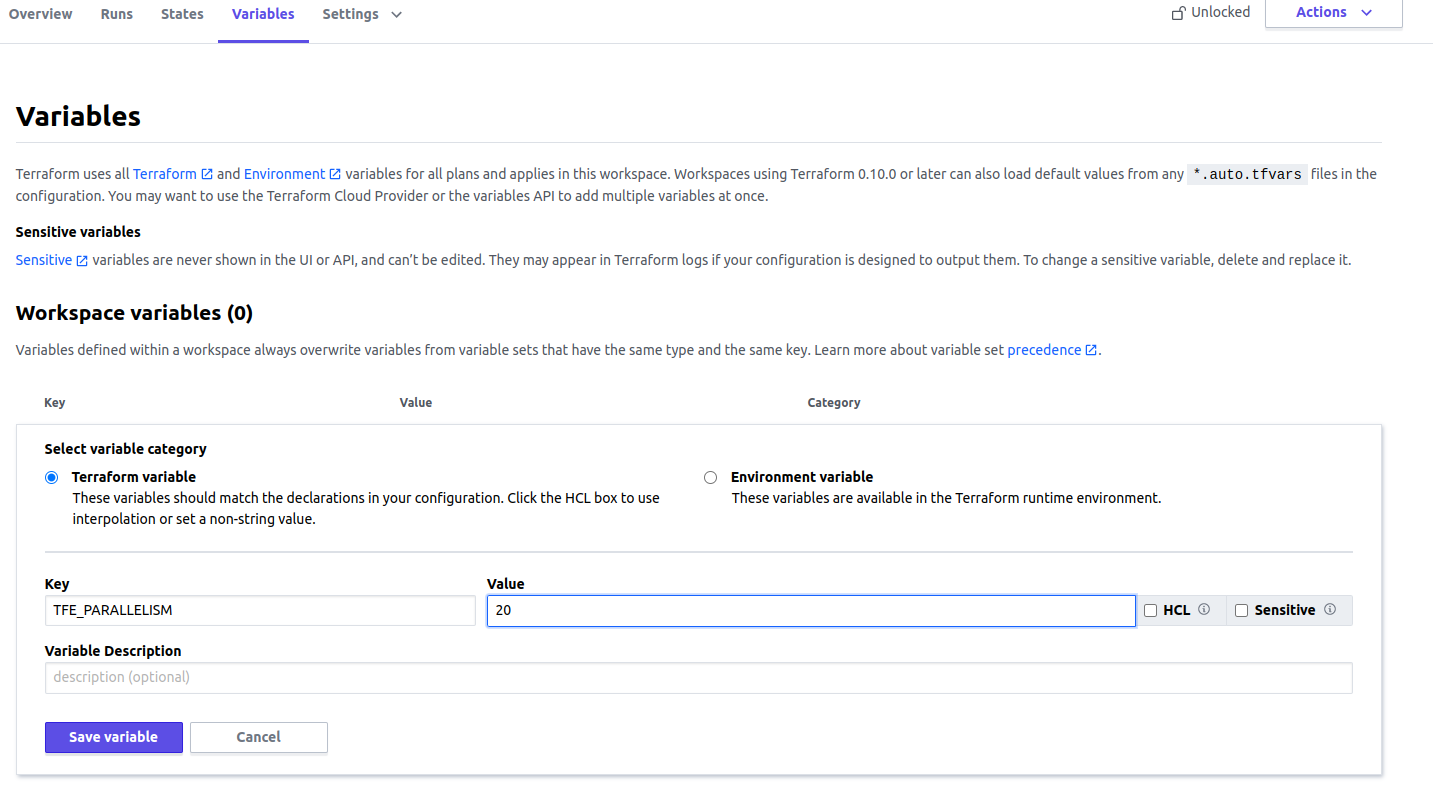
<p>The easiest way to increase parallelism in Terraform Cloud for Remote Execution is the <code>TFE_PARALLELISM</code> variable. It just requires a number. To set this you need to perform those steps:</p>
<ul>
<li>Select your workspace,</li>
<li>Go to <strong>Variables</strong> tab,</li>
<li>Add variable in <strong>Workspace variables</strong> panel and create <code>TFE_PARALLELISM</code> variable:
<img src="/posts/cloud/how-to-set-parallelism-in-terraform-cloud/workspace_tfe_parallelism.png" alt="Workspace TFE_PARALLELISM variable">
<blockquote>
<p>Ensure you have selected <strong>Environment variable</strong> button</p>
</blockquote>
</li>
</ul>
<p>The change should be available on next execution.</p>
<h2 id="manage-parallelism-for-each-stage-of-execution">Manage parallelism for each stage of execution</h2>
<p>Terraform CLI allows configuring parallelism differently per command (<code>terraform plan</code>, <code>terraform apply</code> or <code>terraform destroy</code>). In Terraform Cloud we can also do this. In these cases, use <code>TF_CLI_ARGS_plan=&quot;-parallelism=&lt;N&gt;&quot;</code> or <code>TF_CLI_ARGS_apply=&quot;-parallelism=&lt;N&gt;&quot;</code> environment variables instead of <code>TFE_PARALLELISM</code>.</p>
<p>I prefer this way because it allows being more granular. I want to run plan fast because it makes a request about every resource.</p>
<p>To set <code>TF_CLI_ARGS_plan=&quot;-parallelism=&lt;N&gt;&quot;</code> or <code>TF_CLI_ARGS_apply=&quot;-parallelism=&lt;N&gt;&quot;</code> parameters perform same steps as in instruction written above for <code>TFE_PARALLELISM</code>.</p>
<h2 id="manage-the-variables-in-a-single-place">Manage the variables in a single place</h2>
<p>I showed how to configure a variable per workspace. Terraform Cloud allows configuring a <strong>Variable set</strong> which can be attached to each workspace, so we don&rsquo;t need to repeat ourselves for each workspace.</p>
<p>To configure <strong>Variable set</strong> do:</p>
<ul>
<li>Go to your organization <strong>Settings</strong></li>
<li>Select <strong>Variable set</strong> tab and click button <strong>Create variable set</strong></li>
<li>In <strong>Variables</strong> panel you need to define your variables</li>
</ul>
<p>What is left is to attach the variable set to your workspace, or you can enable this set for all workspaces in the organization.</p>
<p><strong>Variables set</strong> has lower precedence than workspace variables. Definition of the same variable in workspace will be used in execution. <a href="https://www.terraform.io/cloud-docs/workspaces/variables#precedence" target="_blank" rel="noopener">Here</a> you can read more.</p>
]]></content><category scheme="https://6f95e4af.mjasion.pages.dev/tags/terraform" term="terraform" label="terraform"/><category scheme="https://6f95e4af.mjasion.pages.dev/tags/terraform-cloud" term="terraform-cloud" label="terraform-cloud"/><category scheme="https://6f95e4af.mjasion.pages.dev/tags/performance" term="performance" label="performance"/></entry></feed>