<?xml version="1.0" encoding="utf-8"?><feed xmlns="http://www.w3.org/2005/Atom" xml:lang="en-us"><generator uri="https://gohugo.io/" version="0.156.0">Hugo</generator><title type="html">Development on Marcin Jasion - Pragmatic DevOps</title><link href="https://6f95e4af.mjasion.pages.dev/posts/development/" rel="alternate" type="text/html" title="html"/><link href="https://6f95e4af.mjasion.pages.dev/posts/development/index.xml" rel="alternate" type="application/rss+xml" title="rss"/><updated>2026-02-25T00:00:00+01:00</updated><id>https://6f95e4af.mjasion.pages.dev/posts/development/</id><entry><title type="html">Why I'm Choosing Cloudflare and TanStack for My Side Projects</title><link href="https://6f95e4af.mjasion.pages.dev/posts/development/why-i-chose-cloudflare-and-tanstack/?utm_source=atom_feed" rel="alternate" type="text/html"/><id>https://6f95e4af.mjasion.pages.dev/posts/development/why-i-chose-cloudflare-and-tanstack/</id><author><name>Marcin Jasion</name></author><published>2026-02-25T00:00:00+01:00</published><updated>2026-02-25T00:00:00+01:00</updated><content type="html"><![CDATA[<blockquote>After building with Vercel and Supabase, I switched to Cloudflare and TanStack.
Here&rsquo;s why - and what I gained.</blockquote><p>I like building side projects. They&rsquo;re how I learn new tools, test ideas, and stay sharp outside of work. Over the past year I&rsquo;ve gone through a few stacks trying to find the right balance between developer experience, cost, and simplicity. I started with Vercel and Supabase. I ended up on Cloudflare and TanStack.</p>
<p>This post is about why.</p>
<h2 id="what-i-moved-away-from">What I moved away from</h2>
<p>Vercel is genuinely excellent for development. The deployment workflow, preview environments, and Next.js integration are top-notch. For a team shipping a product, it makes a lot of sense. But for side projects the free tier is limited, and the moment you need anything beyond it - more bandwidth, analytics, or team features - the Pro plan jumps to $20/month per member. That adds up fast when you&rsquo;re just experimenting.</p>
<p>Supabase has a similar story. It markets itself as a Firebase alternative with a Postgres database, and it is. But &ldquo;Postgres under the hood&rdquo; means you&rsquo;re still writing SQL for everything - migrations, functions, triggers. The bigger friction is Row Level Security (RLS). In theory it&rsquo;s elegant: your authorization lives in the database. In practice, writing and debugging RLS policies is painful. Every new table needs policies, every edge case needs another rule, and it slows you down when you&rsquo;re prototyping.</p>
<p>When you combine the two, the costs stack up. Two paid services, two billing dashboards, and the Supabase free tier doesn&rsquo;t include automatic backups. For a side project that might sit idle for weeks, that&rsquo;s hard to justify.</p>
<h2 id="why-cloudflare-">Why Cloudflare ☁️</h2>
<p>Cloudflare solves most of what bothered me about the previous stack. Everything runs at the edge - Workers, Pages, KV, D1 - distributed globally without any configuration. Your side project in Warsaw serves just as fast in Tokyo. Instead of stitching together Vercel for hosting and Supabase for the database, you get everything in one place: compute, hosting, database, key-value store, object storage, queues, and cron triggers. One dashboard, one bill.</p>
<p>The free tier is what sealed it for me. Workers get 100,000 requests/day, Pages offers unlimited sites and bandwidth, D1 gives you 5 GB of storage with 5 million reads/day, KV handles 100,000 reads/day, and R2 provides 10 GB with no egress fees. For a side project, you may never leave the free tier. And when you do, the paid plans are cheap.</p>
<p>After years of working with AWS IAM - writing JSON policies, managing roles, trust relationships - Cloudflare&rsquo;s bindings model feels refreshing. You bind a D1 database or KV namespace to your Worker in <code>wrangler.toml</code>, and it&rsquo;s available as a variable in your code. No IAM roles, no resource ARNs. Want to add a <code>/api</code> route next to your frontend? It&rsquo;s the same Worker - just handle the path. No separate Lambda, no API Gateway configuration, no CORS headaches between services. Your frontend and API live together, share the same bindings, and deploy as one unit. The ecosystem backs this up - TanStack Start, Hono, and React Router all deploy to Workers out of the box. When multiple major frameworks invest in your platform, that&rsquo;s a strong signal.</p>
<h2 id="why-tanstack-">Why TanStack ⚡</h2>
<p>The other half of the equation is the framework. TanStack Start gives you a full-stack React framework with server-side rendering, file-based routing via TanStack Router, and built-in data fetching with TanStack Query. Everything is type-safe end-to-end - from route parameters to API responses. The router catches errors at build time instead of runtime, and Query handles caching, deduplication, and background refetching out of the box.</p>
<p>What matters most for side projects is portability. Unlike Next.js, which is deeply tied to Vercel&rsquo;s infrastructure, TanStack runs anywhere - Cloudflare Workers, Node.js, Deno, or Bun. If I ever want to move, I can. You don&rsquo;t want to be locked in to infrastructure you might stop paying for. The developer experience is excellent without the framework trying to own your deployment.</p>
<h2 id="comparison">Comparison</h2>
<table>
  <thead>
      <tr>
          <th></th>
          <th><strong>Vercel + Supabase</strong></th>
          <th><strong>Cloudflare + TanStack</strong></th>
      </tr>
  </thead>
  <tbody>
      <tr>
          <td><strong>Hosting cost</strong></td>
          <td>Free tier limited; Pro at $20/mo</td>
          <td>Pages: free, unlimited bandwidth</td>
      </tr>
      <tr>
          <td><strong>Database</strong></td>
          <td>Postgres (write SQL, manage RLS); Pro at $25/mo</td>
          <td>D1: 5 GB free, simple SQL</td>
      </tr>
      <tr>
          <td><strong>Key-value store</strong></td>
          <td>Requires additional service (e.g. Upstash)</td>
          <td>KV: included free</td>
      </tr>
      <tr>
          <td><strong>Global distribution</strong></td>
          <td>Edge functions available (paid)</td>
          <td>Everything runs at the edge</td>
      </tr>
      <tr>
          <td><strong>Backups</strong></td>
          <td>Not on free tier</td>
          <td>D1 time-travel recovery included</td>
      </tr>
      <tr>
          <td><strong>Auth complexity</strong></td>
          <td>RLS policies per table</td>
          <td>Flexible - use what you need</td>
      </tr>
      <tr>
          <td><strong>Framework lock-in</strong></td>
          <td>Next.js tied to Vercel</td>
          <td>TanStack runs anywhere</td>
      </tr>
      <tr>
          <td><strong>Single dashboard</strong></td>
          <td>Two separate services</td>
          <td>One platform</td>
      </tr>
  </tbody>
</table>
<h2 id="how-i-structure-a-project">How I structure a project</h2>
<p>In practice, I run two Cloudflare Workers as a monorepo. The frontend is a TanStack Start worker handling SSR and file-based routing. The backend is a <a href="https://hono.dev/" target="_blank" rel="noopener">Hono</a> API worker handling auth, database, and business logic. The frontend calls the backend directly through a Cloudflare <a href="https://developers.cloudflare.com/workers/runtime-apis/bindings/service-bindings/" target="_blank" rel="noopener">service binding</a> - no HTTP round-trip, no CORS, just an internal <code>env.API.fetch()</code> call. Both workers share the same cookie prefix, so auth tokens flow seamlessly between them.</p>
<p>For data, D1 handles the relational storage with Drizzle ORM for type-safe queries and migrations. KV stores session data - specifically refresh tokens for the JWT auth flow. R2 is available for file uploads when needed. Everything is bound to the workers through <code>wrangler.toml</code>, so there&rsquo;s no infrastructure to provision beyond the config file.</p>


<div class="mermaid" align="center" style="background-color: none; border-radius: 5px;">
%%{init: {'theme':'default'}}%%
graph TD
    Browser -->|HTTPS| FW[Frontend Worker - TanStack Start]
    Browser -->|HTTPS /a/| BW[Backend Worker - Hono API]
    FW -->|Service Binding| BW
    BW --> D1[(D1 Database)]
    BW --> KV[(KV Sessions)]
    BW --> R2[(R2 Storage)]
    FW ~~~ BW
</div>

<p>This setup deploys as two workers with a single <code>wrangler deploy</code> per workspace. The service binding between them means the frontend-to-backend call stays within Cloudflare&rsquo;s network - no public endpoint needed for the API.</p>
<p>One small detail worth mentioning: I prefix backend routes with <code>/a/</code> instead of the conventional <code>/api/</code>. I noticed that <code>/api</code> paths are regularly scanned by bots - automated crawlers probing for exposed endpoints, looking for common frameworks and vulnerabilities. Switching to <code>/a/</code> reduced random worker invocations to a minimum. It&rsquo;s a simple change, but it keeps noise out of your logs and your free tier usage low.</p>
<h2 id="cloudflares-perception-problem">Cloudflare&rsquo;s perception problem</h2>
<p>I have a feeling that Cloudflare is not promoted enough as a hosting and application platform. Most developers still think of it as a CDN or a DNS provider. When they hear &ldquo;Workers,&rdquo; they picture a backend-only compute layer - something like AWS Lambda, not a place to run a full-stack app. But Workers serve static assets alongside your server code. You deploy one thing and it handles everything.</p>
<p>D1 has a similar perception issue. People hear &ldquo;SQLite&rdquo; and immediately associate it with pet projects or local development. SQLite on a single machine - sure. But D1 is SQLite replicated globally across Cloudflare&rsquo;s network. It handles reads at the edge with automatic replication. That&rsquo;s not a pet project database - that&rsquo;s a globally distributed data layer. Yet the &ldquo;SQLite&rdquo; label makes people dismiss it before looking at what it actually does.</p>
<p>The result is that Cloudflare has quietly built a serious application platform - Workers, Pages, D1, KV, R2, Queues, Durable Objects - but many developers don&rsquo;t consider it because the naming and associations don&rsquo;t match what they expect from &ldquo;enterprise&rdquo; or &ldquo;production-grade&rdquo; infrastructure.</p>
<h3 id="a-note-on-reliability">A note on reliability</h3>
<p>Cloudflare has had several notable downtimes in recent months, and that&rsquo;s worth acknowledging. If your side project grows into something people rely on, a single-vendor dependency becomes a real risk. The good news is that the stack I described is portable by design. TanStack Start can run on <a href="https://johanneskonings.dev/blog/2025-11-30-tanstack-start-aws-serverless/" target="_blank" rel="noopener">AWS Lambda via serverless</a> or on <a href="https://medium.com/@chadbell045/deploying-tanstack-start-on-cloud-run-with-docker-bun-d4e66c246557" target="_blank" rel="noopener">Google Cloud Run with Docker and Bun</a>. Hono has first-class support for both <a href="https://hono.dev/docs/getting-started/aws-lambda" target="_blank" rel="noopener">AWS Lambda</a> and <a href="https://hono.dev/docs/getting-started/google-cloud-run" target="_blank" rel="noopener">Google Cloud Run</a>. Neither framework locks you into Cloudflare&rsquo;s runtime.</p>
<p>For one of my side projects I&rsquo;ve started exploring this as an option - setting up a backup for API endpoints on AWS or GCP, so that if Cloudflare becomes unavailable, traffic can fail over to an alternative. It&rsquo;s a wider architecture problem that touches DNS failover, database replication, and session portability. I might write a dedicated post about it in the future.</p>
<h2 id="closing-thoughts">Closing thoughts</h2>
<p>There&rsquo;s no perfect stack. Vercel and Supabase are solid products, and for a funded team shipping fast, they might be the right choice. But for side projects - where you want to keep costs near zero, avoid unnecessary complexity, and still build something real - Cloudflare and TanStack hit the sweet spot.</p>
<p>I get global distribution for free, a database that doesn&rsquo;t require RLS gymnastics, and a framework that doesn&rsquo;t lock me in. That&rsquo;s enough to ship ideas without worrying about the bill.</p>
]]></content><category scheme="https://6f95e4af.mjasion.pages.dev/tags/cloudflare" term="cloudflare" label="cloudflare"/><category scheme="https://6f95e4af.mjasion.pages.dev/tags/tanstack" term="tanstack" label="tanstack"/><category scheme="https://6f95e4af.mjasion.pages.dev/tags/frontend" term="frontend" label="frontend"/><category scheme="https://6f95e4af.mjasion.pages.dev/tags/side-projects" term="side-projects" label="side-projects"/></entry><entry><title type="html">Deploy your first blockchain contract to Ethereum</title><link href="https://6f95e4af.mjasion.pages.dev/posts/development/first-blockchain-contract/?utm_source=atom_feed" rel="alternate" type="text/html"/><id>https://6f95e4af.mjasion.pages.dev/posts/development/first-blockchain-contract/</id><author><name>Marcin Jasion</name></author><published>2022-04-09T10:00:00+00:00</published><updated>2022-04-09T10:00:00+00:00</updated><content type="html"><![CDATA[<blockquote>Step by step guide to deploy first contract on Ethereum blockchain</blockquote><h2 id="first-contract---pet-owners">First contract - Pet owners</h2>
<p>I am learning blockchain and smart contracts. This post will be my note on how I am starting my journey into blockchain technology.</p>
<p>In this example I will create a contract for storing who is owning a Pet.</p>
<h2 id="development">Development</h2>
<div class="highlight"><pre tabindex="0" style="color:#f8f8f2;background-color:#272822;-moz-tab-size:4;-o-tab-size:4;tab-size:4;-webkit-text-size-adjust:none;"><code class="language-solidity" data-lang="solidity"><span style="display:flex;"><span><span style="color:#75715e">// SPDX-License-Identifier: MIT
</span></span></span><span style="display:flex;"><span><span style="color:#66d9ef">pragma solidity</span> <span style="color:#f92672">^</span><span style="color:#ae81ff">0</span>.<span style="color:#ae81ff">8</span>.<span style="color:#ae81ff">0</span>; <span style="color:#75715e">//build contract on top of Solidity &gt;=0.8.0 and &lt;0.9.0
</span></span></span><span style="display:flex;"><span>
</span></span><span style="display:flex;"><span><span style="color:#66d9ef">contract</span> <span style="color:#a6e22e">PetOwner</span> {
</span></span><span style="display:flex;"><span>    <span style="color:#66d9ef">mapping</span> (<span style="color:#66d9ef">string</span> <span style="color:#f92672">=&gt;</span> Pet) <span style="color:#66d9ef">public</span> petOwners;
</span></span><span style="display:flex;"><span>
</span></span><span style="display:flex;"><span>    <span style="color:#66d9ef">struct</span> <span style="color:#a6e22e">Pet</span> {
</span></span><span style="display:flex;"><span>        <span style="color:#66d9ef">string</span> name;
</span></span><span style="display:flex;"><span>        <span style="color:#66d9ef">string</span> petType;
</span></span><span style="display:flex;"><span>    }
</span></span><span style="display:flex;"><span>
</span></span><span style="display:flex;"><span>    <span style="color:#66d9ef">function</span> <span style="color:#a6e22e">addPetOwner</span>(<span style="color:#66d9ef">string</span> <span style="color:#66d9ef">memory</span> ownerName, <span style="color:#66d9ef">string</span> <span style="color:#66d9ef">memory</span> _name, <span style="color:#66d9ef">string</span> <span style="color:#66d9ef">memory</span> _petType) <span style="color:#66d9ef">public</span> {
</span></span><span style="display:flex;"><span>        petOwners[ownerName] <span style="color:#f92672">=</span> Pet({name<span style="color:#f92672">:</span> _name, petType<span style="color:#f92672">:</span> _petType});
</span></span><span style="display:flex;"><span>    }
</span></span><span style="display:flex;"><span>
</span></span><span style="display:flex;"><span>}
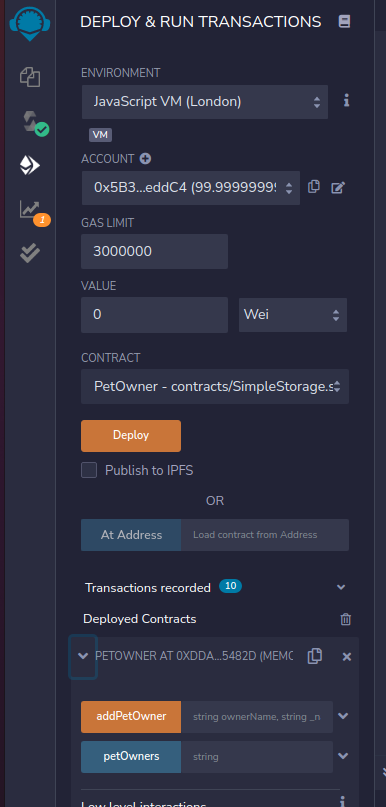
</span></span></code></pre></div><p>Put it in the Remix IDE: <a href="https://remix.ethereum.org/" target="_blank" rel="noopener">https://remix.ethereum.org/</a>. It should compile and we can deploy it on the local environment:</p>
<p><img src="/posts/development/first-blockchain-contract/deploy_smart_contract.png" alt="Deploy contract"></p>
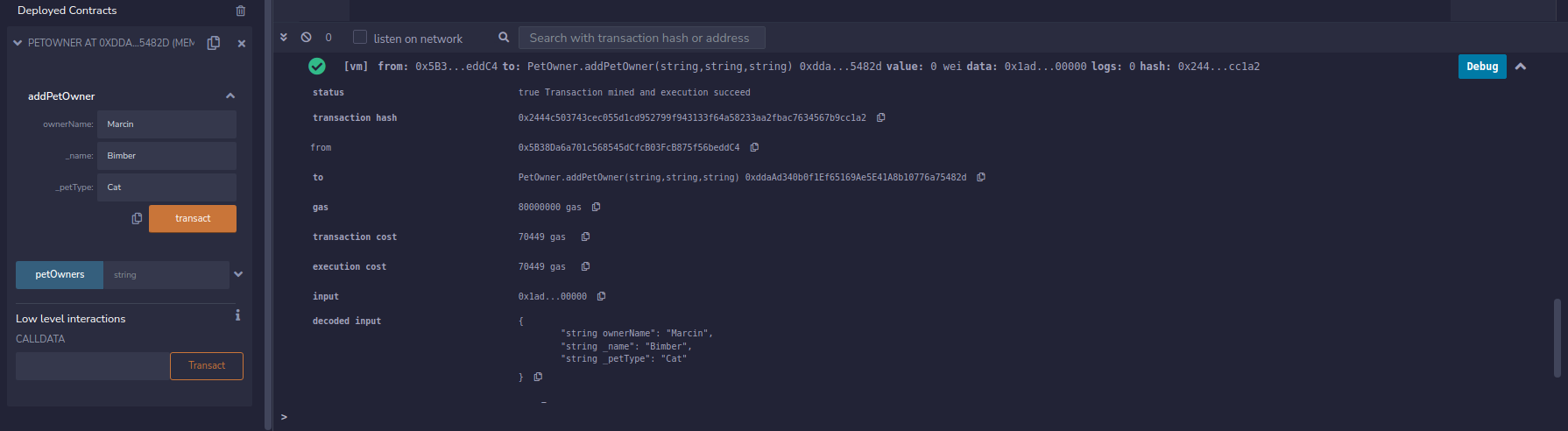
<p>When we have contract deployed we can create example contract ownership</p>
<p><img src="/posts/development/first-blockchain-contract/create_test_transaction.png" alt="Test Transaction"></p>
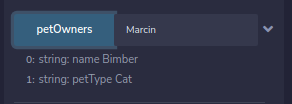
<p>and ask <code>petOwners</code> field for information which Pet is owned by <code>Marcin</code>.</p>
<p><img src="/posts/development/first-blockchain-contract/check_test_transaction.png" alt="Test check"></p>
<h2 id="lets-deploy-it-to-ethereum-test-network">Let&rsquo;s deploy it to Ethereum test network</h2>
<p>Ethereum allows testing our contract on test networks. For this example I will use Rinkeby. This is a free network for testing smart contracts.</p>
<blockquote>
<p>I am not covering how to install Metamask. Always remember to not share <strong>private key</strong> and <strong>seed</strong>
You can always create a new Metamask identity for your tests.</p>
</blockquote>
<ol>
<li>Switch the Remix Environment from <code>Javascript VM</code> to <code>Injected Web3</code></li>
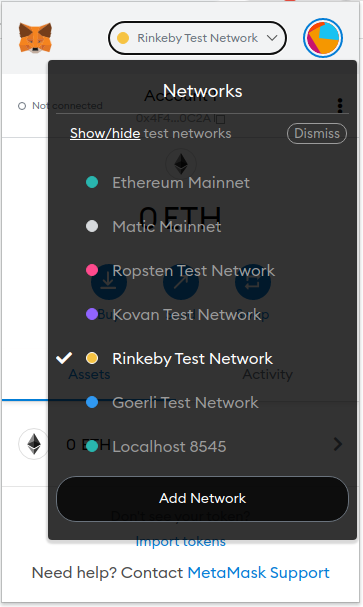
<li>Connect your Metamask. Ensure you have chosen Rinkeby network
<img src="/posts/development/first-blockchain-contract/metamask_rinkeby.png" alt="Metamask Rinkeby Network"></li>
<li>If you don&rsquo;t have any <code>ETH</code> coins you can use this Faucet to grab some: <a href="https://faucets.chain.link/rinkeby" target="_blank" rel="noopener">https://faucets.chain.link/rinkeby</a></li>
<li>Click deploy. You will be asked by Metamask to confirm the transaction: <a href="https://rinkeby.etherscan.io/tx/0x60ad0e4b25ba4dadef1410d766222b30815fe9e6bc7168cd6cd0f205bb4d90e3" target="_blank" rel="noopener">Contract deployment transaction</a></li>
</ol>
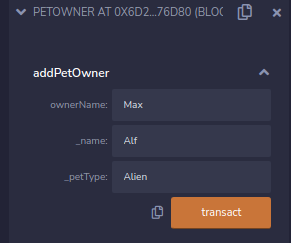
<p>Now I can test my contract. I fill the data
<img src="/posts/development/first-blockchain-contract/rinkeby-example-data.png" alt=""></p>
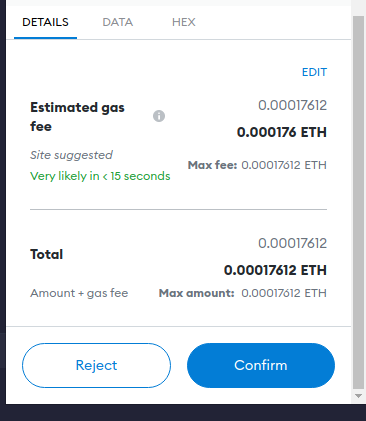
<p>And we will be asked again for confirming the transaction
<img src="/posts/development/first-blockchain-contract/metamask-example-contract.png" alt="">.</p>
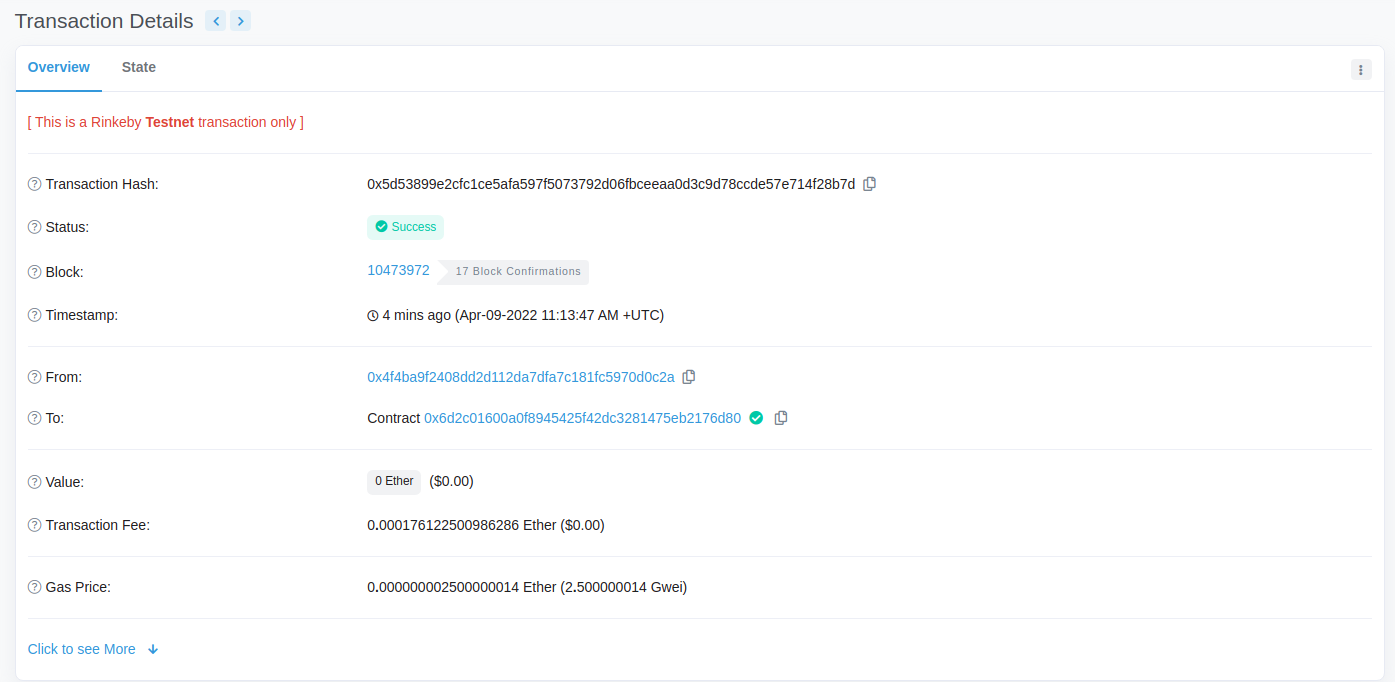
<p>When everything will be done, our transaction should be visible on <a href="https://rinkeby.etherscan.io/tx/0x5d53899e2cfc1ce5afa597f5073792d06fbceeaa0d3c9d78ccde57e714f28b7d" target="_blank" rel="noopener">Etherscan</a>
<img src="/posts/development/first-blockchain-contract/etherscan.png" alt="Etherscan"></p>
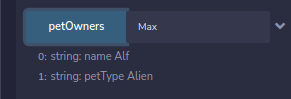
<p>And at the end we can check if <code>petOwner</code> field contains our definition:
<img src="/posts/development/first-blockchain-contract/rinkeby-data-confirmation.png" alt=""></p>
<hr>
<p><em>This post contains my notes from a Blockchain development tutorial available <a href="https://www.youtube.com/watch?v=M576WGiDBdQ" target="_blank" rel="noopener">here</a>.</em></p>
]]></content><category scheme="https://6f95e4af.mjasion.pages.dev/tags/ethereum" term="ethereum" label="ethereum"/><category scheme="https://6f95e4af.mjasion.pages.dev/tags/blockchain" term="blockchain" label="blockchain"/><category scheme="https://6f95e4af.mjasion.pages.dev/tags/solidity" term="solidity" label="solidity"/><category scheme="https://6f95e4af.mjasion.pages.dev/tags/tutorial" term="tutorial" label="tutorial"/></entry><entry><title type="html">How to label GitLab notification in Gmail by headers?</title><link href="https://6f95e4af.mjasion.pages.dev/posts/development/label-gitlab-notifications/?utm_source=atom_feed" rel="alternate" type="text/html"/><id>https://6f95e4af.mjasion.pages.dev/posts/development/label-gitlab-notifications/</id><author><name>Marcin Jasion</name></author><published>2020-04-17T10:00:00+00:00</published><updated>2020-04-17T10:00:00+00:00</updated><content type="html"><![CDATA[<blockquote>You can label emails by headers in Gmail. To do this you have to create a script that periodically scans for new emails in your inbox. To demonstrate it I will use Gitlab notifications and we will add labels to messages basing on their headers</blockquote><p><em>Updated on 24-02-2026: Improved the script to use <code>getHeader()</code> instead of raw body search, added data-driven header configuration, and auto-creation of labels.</em></p>
<h2 id="-how-gitlab-sends-notifications">📨 How GitLab sends notifications?</h2>
<p>GitLab allows you to stay informed about what’s happening in your projects sending you the notifications via email. With enabled notifications, you can receive updates about activity in issues, merge requests or build results. All of those emails are sent from a single address which without a doubt makes it harder to do successful filtering and labeling.</p>
<p>However GitLab adds custom headers to every sent notification to allow you to better manage received notification and for example, you could add a label to all emails with pipelines results to mark them as important. Similarly, you could make the same scenario for notification about the issue assigned to you. Some of the headers that you can find in emails are:</p>
<center>
<table>
  <thead>
      <tr>
          <th style="text-align: left">Header name</th>
          <th style="text-align: left">Reason of message</th>
      </tr>
  </thead>
  <tbody>
      <tr>
          <td style="text-align: left"><code>X-GitLab-Project</code></td>
          <td style="text-align: left">Notification from project</td>
      </tr>
      <tr>
          <td style="text-align: left"><code>X-GitLab-Issue-ID</code></td>
          <td style="text-align: left">Notification about a change in <strong>issue</strong>.</td>
      </tr>
      <tr>
          <td style="text-align: left"><code>X-GitLab-MergeRequest-ID</code></td>
          <td style="text-align: left">Notification about a change in <strong>merge request</strong>.</td>
      </tr>
      <tr>
          <td style="text-align: left"><code>X-GitLab-Pipeline-Id</code></td>
          <td style="text-align: left">Notification about the <strong>result of pipeline</strong>.</td>
      </tr>
  </tbody>
</table>
</center>
<p>As can be seen above headers allow you to create example condition: if the email contains the header <code>X-GitLab-Issue-ID</code> then add a label “GitLab Issue”.</p>
<p>Of course, there are more headers available. The full list of headers, which GitLab can include to emails is available in the section “<a href="https://docs.gitlab.com/ee/user/profile/notifications.html#filtering-email" target="_blank" rel="noopener">Filtering email</a>” of GitLab documentation. Every header also contains a value. Some headers contain an ID, some contain names of projects. You can check out them in the documentation.</p>
<h2 id="-how-to-filter-emails-in-gmail-by-header">📥 How to filter emails in Gmail by header?</h2>
<p>To automatically add labels in Gmail you have to create a filter. However, it does not allow to filter by headers. But this is not impossible.</p>
<p>Google provides a special service called Google Apps Scripts. It allows you to write short scripts in JavaScript, where you can extend default Gmail filtering.</p>
<h2 id="-how-can-i-add-a-label-to-message-by-headers">⌨️ How can I add a label to message by headers?</h2>
<p>Firstly you have to begin with function, which will be scheduled to query for new emails in the inbox and will execute further message processing:</p>
<div class="highlight"><pre tabindex="0" style="color:#f8f8f2;background-color:#272822;-moz-tab-size:4;-o-tab-size:4;tab-size:4;-webkit-text-size-adjust:none;"><code class="language-js" data-lang="js"><span style="display:flex;"><span><span style="color:#66d9ef">function</span> <span style="color:#a6e22e">processInbox</span>() {
</span></span><span style="display:flex;"><span>   <span style="color:#75715e">// process all recent threads in the Inbox
</span></span></span><span style="display:flex;"><span>   <span style="color:#66d9ef">var</span> <span style="color:#a6e22e">threads</span> <span style="color:#f92672">=</span> <span style="color:#a6e22e">GmailApp</span>.<span style="color:#a6e22e">search</span>(<span style="color:#e6db74">&#34;in:inbox from:gitlab@* newer_than:1h&#34;</span>);
</span></span><span style="display:flex;"><span>   <span style="color:#66d9ef">for</span> (<span style="color:#66d9ef">var</span> <span style="color:#a6e22e">i</span> <span style="color:#f92672">=</span> <span style="color:#ae81ff">0</span>; <span style="color:#a6e22e">i</span> <span style="color:#f92672">&lt;</span> <span style="color:#a6e22e">threads</span>.<span style="color:#a6e22e">length</span>; <span style="color:#a6e22e">i</span><span style="color:#f92672">++</span>) {
</span></span><span style="display:flex;"><span>      <span style="color:#75715e">// get all messages in a given thread
</span></span></span><span style="display:flex;"><span>      <span style="color:#66d9ef">var</span> <span style="color:#a6e22e">messages</span> <span style="color:#f92672">=</span> <span style="color:#a6e22e">threads</span>[<span style="color:#a6e22e">i</span>].<span style="color:#a6e22e">getMessages</span>();
</span></span><span style="display:flex;"><span>      <span style="color:#66d9ef">for</span> (<span style="color:#66d9ef">var</span> <span style="color:#a6e22e">j</span> <span style="color:#f92672">=</span> <span style="color:#ae81ff">0</span>; <span style="color:#a6e22e">j</span> <span style="color:#f92672">&lt;</span> <span style="color:#a6e22e">messages</span>.<span style="color:#a6e22e">length</span>; <span style="color:#a6e22e">j</span><span style="color:#f92672">++</span>) {
</span></span><span style="display:flex;"><span>         <span style="color:#66d9ef">var</span> <span style="color:#a6e22e">message</span> <span style="color:#f92672">=</span> <span style="color:#a6e22e">messages</span>[<span style="color:#a6e22e">j</span>];
</span></span><span style="display:flex;"><span>         <span style="color:#a6e22e">processMessage</span>(<span style="color:#a6e22e">message</span>); <span style="color:#75715e">// function to process the message
</span></span></span><span style="display:flex;"><span>      }
</span></span><span style="display:flex;"><span>   }
</span></span><span style="display:flex;"><span>}
</span></span></code></pre></div><p>As you see, the code is pretty simple. It uses <code>search()</code> function from <a href="https://developers.google.com/apps-script/reference/gmail" target="_blank" rel="noopener">GmailApp</a> which allows you to interact with Gmail service. The search query <code>&quot;in:inbox from:gitlab@* newer_than:1h&quot;</code> filters only GitLab emails from the last hour. After that we have to get the message content. We can do it by writing a loop to get every message from a thread. The <code>getMessages()</code> function returns a list of <a href="https://developers.google.com/apps-script/reference/gmail/gmail-message" target="_blank" rel="noopener">Gmail Messages</a> objects. Having them we can implement our actions based on the content.</p>
<p>To do that you can use the <code>getHeader()</code> function on the message object to read a specific email header by name. For example, to check the pipeline status:</p>
<div class="highlight"><pre tabindex="0" style="color:#f8f8f2;background-color:#272822;-moz-tab-size:4;-o-tab-size:4;tab-size:4;-webkit-text-size-adjust:none;"><code class="language-js" data-lang="js"><span style="display:flex;"><span><span style="color:#66d9ef">var</span> <span style="color:#a6e22e">status</span> <span style="color:#f92672">=</span> <span style="color:#a6e22e">message</span>.<span style="color:#a6e22e">getHeader</span>(<span style="color:#e6db74">&#34;X-GitLab-Pipeline-Status&#34;</span>);
</span></span><span style="display:flex;"><span><span style="color:#66d9ef">if</span> (<span style="color:#a6e22e">status</span>) {
</span></span><span style="display:flex;"><span>  <span style="color:#75715e">// header exists - this is a pipeline notification
</span></span></span><span style="display:flex;"><span>}
</span></span></code></pre></div><p>This is more reliable than searching the raw email body for header names, which could produce false positives if the header name appears in the message text.</p>
<p>To make the script easy to extend, we can define a configuration map that describes which headers to look for and what labels to apply. The full script looks like this:</p>
<div class="highlight"><pre tabindex="0" style="color:#f8f8f2;background-color:#272822;-moz-tab-size:4;-o-tab-size:4;tab-size:4;-webkit-text-size-adjust:none;"><code class="language-js" data-lang="js"><span style="display:flex;"><span><span style="color:#75715e">// Label to apply on any GitLab match
</span></span></span><span style="display:flex;"><span><span style="color:#66d9ef">var</span> <span style="color:#a6e22e">mainLabel</span> <span style="color:#f92672">=</span> <span style="color:#e6db74">&#34;GitLab&#34;</span>;
</span></span><span style="display:flex;"><span>
</span></span><span style="display:flex;"><span><span style="color:#75715e">// Configuration: header → label mapping
</span></span></span><span style="display:flex;"><span><span style="color:#75715e">// nestValue: true  → creates sub-label with the header value, e.g. Pipeline/failed
</span></span></span><span style="display:flex;"><span><span style="color:#75715e">// matchValue: &#34;x&#34;  → only applies the label when the header value equals &#34;x&#34;
</span></span></span><span style="display:flex;"><span><span style="color:#66d9ef">var</span> <span style="color:#a6e22e">headersMap</span> <span style="color:#f92672">=</span> {
</span></span><span style="display:flex;"><span>  <span style="color:#e6db74">&#34;X-GitLab-Pipeline-Status&#34;</span><span style="color:#f92672">:</span>      { <span style="color:#e6db74">&#34;label_name&#34;</span><span style="color:#f92672">:</span> <span style="color:#e6db74">&#34;Pipeline&#34;</span>,   <span style="color:#e6db74">&#34;nestValue&#34;</span><span style="color:#f92672">:</span> <span style="color:#66d9ef">true</span> },
</span></span><span style="display:flex;"><span>  <span style="color:#e6db74">&#34;X-GitLab-Project&#34;</span><span style="color:#f92672">:</span>              { <span style="color:#e6db74">&#34;label_name&#34;</span><span style="color:#f92672">:</span> <span style="color:#e6db74">&#34;Project&#34;</span>,    <span style="color:#e6db74">&#34;nestValue&#34;</span><span style="color:#f92672">:</span> <span style="color:#66d9ef">true</span> },
</span></span><span style="display:flex;"><span>  <span style="color:#e6db74">&#34;X-GitLab-NotificationReason&#34;</span><span style="color:#f92672">:</span>   { <span style="color:#e6db74">&#34;label_name&#34;</span><span style="color:#f92672">:</span> <span style="color:#e6db74">&#34;Reason&#34;</span>,     <span style="color:#e6db74">&#34;nestValue&#34;</span><span style="color:#f92672">:</span> <span style="color:#66d9ef">true</span> },
</span></span><span style="display:flex;"><span>  <span style="color:#e6db74">&#34;X-GitLab-Issue-ID&#34;</span><span style="color:#f92672">:</span>             { <span style="color:#e6db74">&#34;label_name&#34;</span><span style="color:#f92672">:</span> <span style="color:#e6db74">&#34;Issue&#34;</span> },
</span></span><span style="display:flex;"><span>  <span style="color:#e6db74">&#34;X-GitLab-MergeRequest-ID&#34;</span><span style="color:#f92672">:</span>      { <span style="color:#e6db74">&#34;label_name&#34;</span><span style="color:#f92672">:</span> <span style="color:#e6db74">&#34;MergeRequest&#34;</span> },
</span></span><span style="display:flex;"><span>  <span style="color:#e6db74">&#34;X-GitLab-Discussion-ID&#34;</span><span style="color:#f92672">:</span>        { <span style="color:#e6db74">&#34;label_name&#34;</span><span style="color:#f92672">:</span> <span style="color:#e6db74">&#34;Discussion&#34;</span> },
</span></span><span style="display:flex;"><span>  <span style="color:#e6db74">&#34;X-GitLab-MergeRequest-State&#34;</span><span style="color:#f92672">:</span>   { <span style="color:#e6db74">&#34;label_name&#34;</span><span style="color:#f92672">:</span> <span style="color:#e6db74">&#34;Merged&#34;</span>,     <span style="color:#e6db74">&#34;matchValue&#34;</span><span style="color:#f92672">:</span> <span style="color:#e6db74">&#34;merged&#34;</span> },
</span></span><span style="display:flex;"><span>};
</span></span><span style="display:flex;"><span>
</span></span><span style="display:flex;"><span><span style="color:#66d9ef">function</span> <span style="color:#a6e22e">processInbox</span>() {
</span></span><span style="display:flex;"><span>  <span style="color:#66d9ef">var</span> <span style="color:#a6e22e">threads</span> <span style="color:#f92672">=</span> <span style="color:#a6e22e">GmailApp</span>.<span style="color:#a6e22e">search</span>(<span style="color:#e6db74">&#34;in:inbox from:gitlab@* newer_than:1h&#34;</span>);
</span></span><span style="display:flex;"><span>  <span style="color:#66d9ef">for</span> (<span style="color:#66d9ef">var</span> <span style="color:#a6e22e">i</span> <span style="color:#f92672">=</span> <span style="color:#ae81ff">0</span>; <span style="color:#a6e22e">i</span> <span style="color:#f92672">&lt;</span> <span style="color:#a6e22e">threads</span>.<span style="color:#a6e22e">length</span>; <span style="color:#a6e22e">i</span><span style="color:#f92672">++</span>) {
</span></span><span style="display:flex;"><span>    <span style="color:#66d9ef">var</span> <span style="color:#a6e22e">messages</span> <span style="color:#f92672">=</span> <span style="color:#a6e22e">threads</span>[<span style="color:#a6e22e">i</span>].<span style="color:#a6e22e">getMessages</span>();
</span></span><span style="display:flex;"><span>    <span style="color:#66d9ef">for</span> (<span style="color:#66d9ef">var</span> <span style="color:#a6e22e">j</span> <span style="color:#f92672">=</span> <span style="color:#ae81ff">0</span>; <span style="color:#a6e22e">j</span> <span style="color:#f92672">&lt;</span> <span style="color:#a6e22e">messages</span>.<span style="color:#a6e22e">length</span>; <span style="color:#a6e22e">j</span><span style="color:#f92672">++</span>) {
</span></span><span style="display:flex;"><span>      <span style="color:#a6e22e">processMessage</span>(<span style="color:#a6e22e">messages</span>[<span style="color:#a6e22e">j</span>]);
</span></span><span style="display:flex;"><span>    }
</span></span><span style="display:flex;"><span>  }
</span></span><span style="display:flex;"><span>}
</span></span><span style="display:flex;"><span>
</span></span><span style="display:flex;"><span><span style="color:#66d9ef">function</span> <span style="color:#a6e22e">processMessage</span>(<span style="color:#a6e22e">message</span>) {
</span></span><span style="display:flex;"><span>  <span style="color:#66d9ef">var</span> <span style="color:#a6e22e">firstMatch</span> <span style="color:#f92672">=</span> <span style="color:#66d9ef">true</span>;
</span></span><span style="display:flex;"><span>  <span style="color:#66d9ef">for</span> (<span style="color:#66d9ef">var</span> <span style="color:#a6e22e">header</span> <span style="color:#66d9ef">in</span> <span style="color:#a6e22e">headersMap</span>) {
</span></span><span style="display:flex;"><span>    <span style="color:#66d9ef">var</span> <span style="color:#a6e22e">val</span> <span style="color:#f92672">=</span> <span style="color:#a6e22e">message</span>.<span style="color:#a6e22e">getHeader</span>(<span style="color:#a6e22e">header</span>);
</span></span><span style="display:flex;"><span>    <span style="color:#66d9ef">if</span> (<span style="color:#a6e22e">val</span>) {
</span></span><span style="display:flex;"><span>      <span style="color:#66d9ef">if</span> (<span style="color:#a6e22e">firstMatch</span>) {
</span></span><span style="display:flex;"><span>        <span style="color:#a6e22e">firstMatch</span> <span style="color:#f92672">=</span> <span style="color:#66d9ef">false</span>;
</span></span><span style="display:flex;"><span>        <span style="color:#a6e22e">addOrCreateLabel</span>(<span style="color:#a6e22e">mainLabel</span>, <span style="color:#a6e22e">message</span>);
</span></span><span style="display:flex;"><span>      }
</span></span><span style="display:flex;"><span>      <span style="color:#66d9ef">var</span> <span style="color:#a6e22e">labelText</span> <span style="color:#f92672">=</span> <span style="color:#a6e22e">headersMap</span>[<span style="color:#a6e22e">header</span>][<span style="color:#e6db74">&#34;label_name&#34;</span>];
</span></span><span style="display:flex;"><span>      <span style="color:#66d9ef">if</span> (<span style="color:#a6e22e">headersMap</span>[<span style="color:#a6e22e">header</span>][<span style="color:#e6db74">&#34;matchValue&#34;</span>]) {
</span></span><span style="display:flex;"><span>        <span style="color:#66d9ef">if</span> (<span style="color:#a6e22e">val</span> <span style="color:#f92672">!=</span> <span style="color:#a6e22e">headersMap</span>[<span style="color:#a6e22e">header</span>][<span style="color:#e6db74">&#34;matchValue&#34;</span>]) <span style="color:#66d9ef">continue</span>;
</span></span><span style="display:flex;"><span>      } <span style="color:#66d9ef">else</span> <span style="color:#66d9ef">if</span> (<span style="color:#a6e22e">headersMap</span>[<span style="color:#a6e22e">header</span>][<span style="color:#e6db74">&#34;nestValue&#34;</span>]) {
</span></span><span style="display:flex;"><span>        <span style="color:#a6e22e">labelText</span> <span style="color:#f92672">+=</span> <span style="color:#e6db74">&#34;/&#34;</span> <span style="color:#f92672">+</span> <span style="color:#a6e22e">val</span>;
</span></span><span style="display:flex;"><span>      }
</span></span><span style="display:flex;"><span>      <span style="color:#a6e22e">addOrCreateLabel</span>(<span style="color:#a6e22e">labelText</span>, <span style="color:#a6e22e">message</span>);
</span></span><span style="display:flex;"><span>    }
</span></span><span style="display:flex;"><span>  }
</span></span><span style="display:flex;"><span>}
</span></span><span style="display:flex;"><span>
</span></span><span style="display:flex;"><span><span style="color:#66d9ef">function</span> <span style="color:#a6e22e">addOrCreateLabel</span>(<span style="color:#a6e22e">labelText</span>, <span style="color:#a6e22e">message</span>) {
</span></span><span style="display:flex;"><span>  <span style="color:#66d9ef">var</span> <span style="color:#a6e22e">label</span> <span style="color:#f92672">=</span> <span style="color:#a6e22e">GmailApp</span>.<span style="color:#a6e22e">getUserLabelByName</span>(<span style="color:#a6e22e">labelText</span>);
</span></span><span style="display:flex;"><span>  <span style="color:#66d9ef">if</span> (<span style="color:#f92672">!</span><span style="color:#a6e22e">label</span>) {
</span></span><span style="display:flex;"><span>    <span style="color:#a6e22e">label</span> <span style="color:#f92672">=</span> <span style="color:#a6e22e">GmailApp</span>.<span style="color:#a6e22e">createLabel</span>(<span style="color:#a6e22e">labelText</span>);
</span></span><span style="display:flex;"><span>  }
</span></span><span style="display:flex;"><span>  <span style="color:#a6e22e">message</span>.<span style="color:#a6e22e">getThread</span>().<span style="color:#a6e22e">addLabel</span>(<span style="color:#a6e22e">label</span>);
</span></span><span style="display:flex;"><span>}
</span></span></code></pre></div><p>The <code>headersMap</code> at the top is the only thing you need to edit to add new labels - no code changes required. Labels are created automatically if they don&rsquo;t exist yet.</p>
<h2 id="-how-to-turn-on-the-script-processing-for-you-gmail-inbox">▶️ How to turn on the script processing for you Gmail inbox?</h2>
<ol>
<li>
<p>Go to <a href="https://script.google.com/home" target="_blank" rel="noopener">Google Apps Scripts</a>.</p>
</li>
<li>
<p>Create a new project, put your code and save.</p>
</li>
<li>
<p>From the Web IDE you can perform the execution to check for errors. Select function <code>processInbox</code> and click Play button:
<img src="/posts/development/label-gitlab-notifications/google_script_run.png" alt="GAS Run"></p>
</li>
<li>
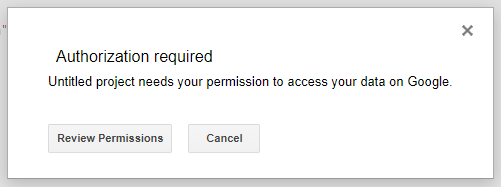
<p>You will be asked to permit a project access to your Gmail data. Choose your account:
<img src="/posts/development/label-gitlab-notifications/google_script_authorization.png" alt="GAS Authorization"></p>
</li>
<li>
<p>After successful authorization, you can re-run the project. It will be immediately executed.</p>
</li>
<li>
<p>When there is no errors, create a custom trigger. Find button: <img src="/posts/development/label-gitlab-notifications/google_script_trigger_button.png" alt="Trigger"></p>
</li>
<li>
<p>Click “Add trigger” button at the bottom of the page.</p>
</li>
<li>
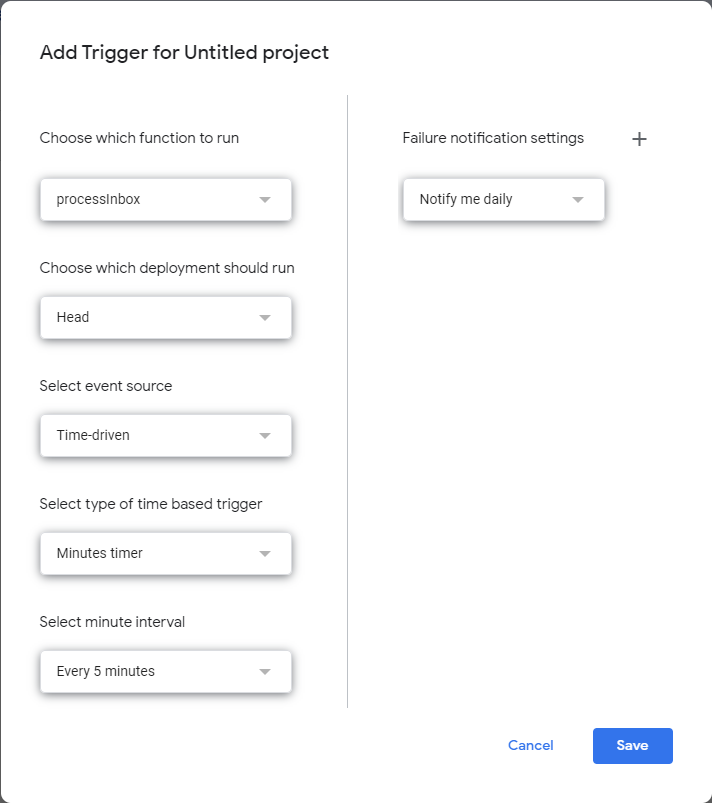
<p>Select function <code>processInbox</code> and configure the time source. The execution frequency is your choice. If you receive a lot of messages and you will run this script every 1 minute you can hit the limits. In the above script, I am scanning for emails from the last hour so the script can be executed at least once an hour.
<img src="/posts/development/label-gitlab-notifications/google_script_new_trigger.png" alt="GAS Trigger"></p>
</li>
</ol>
<h2 id="and-thats-it">🏁And that’s it!</h2>
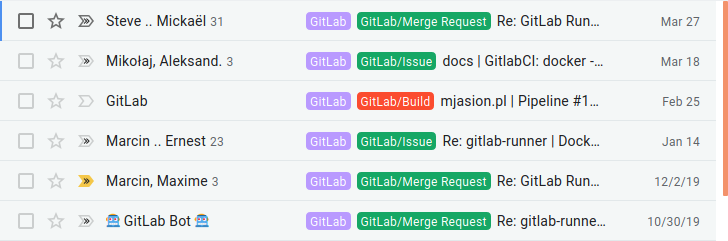
<p>Google should now start executing your script and checking for new emails to make actions which you just implemented. The result of running this script is to label new emails from GitLab as you want 🤗.
<img src="/posts/development/label-gitlab-notifications/gitlab_mails_labeled.png" alt="Labeled emails"></p>
<h2 id="-summarize">📖 Summarize</h2>
<p>Gmail filters are sufficient for most users&rsquo; needs. However, if your use case is more advanced, Google Apps Scripts comes to the rescue. It doesn&rsquo;t require deep programming knowledge and by searching online you can solve your problems. Remember that you can have multiple scripts to process your inbox.</p>
<p>Did you know about Google App Scripts before? Please share how are you using them in the comments below.</p>
]]></content><category scheme="https://6f95e4af.mjasion.pages.dev/tags/gitlab" term="gitlab" label="gitlab"/><category scheme="https://6f95e4af.mjasion.pages.dev/tags/gmail" term="gmail" label="gmail"/><category scheme="https://6f95e4af.mjasion.pages.dev/tags/google-apps-script" term="google-apps-script" label="google-apps-script"/><category scheme="https://6f95e4af.mjasion.pages.dev/tags/automation" term="automation" label="automation"/></entry></feed>