<?xml version="1.0" encoding="utf-8"?><feed xmlns="http://www.w3.org/2005/Atom" xml:lang="en-us"><generator uri="https://gohugo.io/" version="0.156.0">Hugo</generator><title type="html">Marcin Jasion - Pragmatic DevOps</title><link href="https://6f95e4af.mjasion.pages.dev/" rel="alternate" type="text/html" title="html"/><link href="https://6f95e4af.mjasion.pages.dev/index.xml" rel="alternate" type="application/rss+xml" title="rss"/><link href="https://6f95e4af.mjasion.pages.dev/index.json" rel="alternate" type="application/json" title="json"/><updated>2026-02-25T00:00:00+01:00</updated><id>https://6f95e4af.mjasion.pages.dev/</id><entry><title type="html">Why I'm Choosing Cloudflare and TanStack for My Side Projects</title><link href="https://6f95e4af.mjasion.pages.dev/posts/development/why-i-chose-cloudflare-and-tanstack/?utm_source=atom_feed" rel="alternate" type="text/html"/><id>https://6f95e4af.mjasion.pages.dev/posts/development/why-i-chose-cloudflare-and-tanstack/</id><author><name>Marcin Jasion</name></author><published>2026-02-25T00:00:00+01:00</published><updated>2026-02-25T00:00:00+01:00</updated><content type="html"><![CDATA[<blockquote>After building with Vercel and Supabase, I switched to Cloudflare and TanStack.
Here&rsquo;s why - and what I gained.</blockquote><p>I like building side projects. They&rsquo;re how I learn new tools, test ideas, and stay sharp outside of work. Over the past year I&rsquo;ve gone through a few stacks trying to find the right balance between developer experience, cost, and simplicity. I started with Vercel and Supabase. I ended up on Cloudflare and TanStack.</p>
<p>This post is about why.</p>
<h2 id="what-i-moved-away-from">What I moved away from</h2>
<p>Vercel is genuinely excellent for development. The deployment workflow, preview environments, and Next.js integration are top-notch. For a team shipping a product, it makes a lot of sense. But for side projects the free tier is limited, and the moment you need anything beyond it - more bandwidth, analytics, or team features - the Pro plan jumps to $20/month per member. That adds up fast when you&rsquo;re just experimenting.</p>
<p>Supabase has a similar story. It markets itself as a Firebase alternative with a Postgres database, and it is. But &ldquo;Postgres under the hood&rdquo; means you&rsquo;re still writing SQL for everything - migrations, functions, triggers. The bigger friction is Row Level Security (RLS). In theory it&rsquo;s elegant: your authorization lives in the database. In practice, writing and debugging RLS policies is painful. Every new table needs policies, every edge case needs another rule, and it slows you down when you&rsquo;re prototyping.</p>
<p>When you combine the two, the costs stack up. Two paid services, two billing dashboards, and the Supabase free tier doesn&rsquo;t include automatic backups. For a side project that might sit idle for weeks, that&rsquo;s hard to justify.</p>
<h2 id="why-cloudflare-">Why Cloudflare ☁️</h2>
<p>Cloudflare solves most of what bothered me about the previous stack. Everything runs at the edge - Workers, Pages, KV, D1 - distributed globally without any configuration. Your side project in Warsaw serves just as fast in Tokyo. Instead of stitching together Vercel for hosting and Supabase for the database, you get everything in one place: compute, hosting, database, key-value store, object storage, queues, and cron triggers. One dashboard, one bill.</p>
<p>The free tier is what sealed it for me. Workers get 100,000 requests/day, Pages offers unlimited sites and bandwidth, D1 gives you 5 GB of storage with 5 million reads/day, KV handles 100,000 reads/day, and R2 provides 10 GB with no egress fees. For a side project, you may never leave the free tier. And when you do, the paid plans are cheap.</p>
<p>After years of working with AWS IAM - writing JSON policies, managing roles, trust relationships - Cloudflare&rsquo;s bindings model feels refreshing. You bind a D1 database or KV namespace to your Worker in <code>wrangler.toml</code>, and it&rsquo;s available as a variable in your code. No IAM roles, no resource ARNs. Want to add a <code>/api</code> route next to your frontend? It&rsquo;s the same Worker - just handle the path. No separate Lambda, no API Gateway configuration, no CORS headaches between services. Your frontend and API live together, share the same bindings, and deploy as one unit. The ecosystem backs this up - TanStack Start, Hono, and React Router all deploy to Workers out of the box. When multiple major frameworks invest in your platform, that&rsquo;s a strong signal.</p>
<h2 id="why-tanstack-">Why TanStack ⚡</h2>
<p>The other half of the equation is the framework. TanStack Start gives you a full-stack React framework with server-side rendering, file-based routing via TanStack Router, and built-in data fetching with TanStack Query. Everything is type-safe end-to-end - from route parameters to API responses. The router catches errors at build time instead of runtime, and Query handles caching, deduplication, and background refetching out of the box.</p>
<p>What matters most for side projects is portability. Unlike Next.js, which is deeply tied to Vercel&rsquo;s infrastructure, TanStack runs anywhere - Cloudflare Workers, Node.js, Deno, or Bun. If I ever want to move, I can. You don&rsquo;t want to be locked in to infrastructure you might stop paying for. The developer experience is excellent without the framework trying to own your deployment.</p>
<h2 id="comparison">Comparison</h2>
<table>
  <thead>
      <tr>
          <th></th>
          <th><strong>Vercel + Supabase</strong></th>
          <th><strong>Cloudflare + TanStack</strong></th>
      </tr>
  </thead>
  <tbody>
      <tr>
          <td><strong>Hosting cost</strong></td>
          <td>Free tier limited; Pro at $20/mo</td>
          <td>Pages: free, unlimited bandwidth</td>
      </tr>
      <tr>
          <td><strong>Database</strong></td>
          <td>Postgres (write SQL, manage RLS); Pro at $25/mo</td>
          <td>D1: 5 GB free, simple SQL</td>
      </tr>
      <tr>
          <td><strong>Key-value store</strong></td>
          <td>Requires additional service (e.g. Upstash)</td>
          <td>KV: included free</td>
      </tr>
      <tr>
          <td><strong>Global distribution</strong></td>
          <td>Edge functions available (paid)</td>
          <td>Everything runs at the edge</td>
      </tr>
      <tr>
          <td><strong>Backups</strong></td>
          <td>Not on free tier</td>
          <td>D1 time-travel recovery included</td>
      </tr>
      <tr>
          <td><strong>Auth complexity</strong></td>
          <td>RLS policies per table</td>
          <td>Flexible - use what you need</td>
      </tr>
      <tr>
          <td><strong>Framework lock-in</strong></td>
          <td>Next.js tied to Vercel</td>
          <td>TanStack runs anywhere</td>
      </tr>
      <tr>
          <td><strong>Single dashboard</strong></td>
          <td>Two separate services</td>
          <td>One platform</td>
      </tr>
  </tbody>
</table>
<h2 id="how-i-structure-a-project">How I structure a project</h2>
<p>In practice, I run two Cloudflare Workers as a monorepo. The frontend is a TanStack Start worker handling SSR and file-based routing. The backend is a <a href="https://hono.dev/" target="_blank" rel="noopener">Hono</a> API worker handling auth, database, and business logic. The frontend calls the backend directly through a Cloudflare <a href="https://developers.cloudflare.com/workers/runtime-apis/bindings/service-bindings/" target="_blank" rel="noopener">service binding</a> - no HTTP round-trip, no CORS, just an internal <code>env.API.fetch()</code> call. Both workers share the same cookie prefix, so auth tokens flow seamlessly between them.</p>
<p>For data, D1 handles the relational storage with Drizzle ORM for type-safe queries and migrations. KV stores session data - specifically refresh tokens for the JWT auth flow. R2 is available for file uploads when needed. Everything is bound to the workers through <code>wrangler.toml</code>, so there&rsquo;s no infrastructure to provision beyond the config file.</p>


<div class="mermaid" align="center" style="background-color: none; border-radius: 5px;">
%%{init: {'theme':'default'}}%%
graph TD
    Browser -->|HTTPS| FW[Frontend Worker - TanStack Start]
    Browser -->|HTTPS /a/| BW[Backend Worker - Hono API]
    FW -->|Service Binding| BW
    BW --> D1[(D1 Database)]
    BW --> KV[(KV Sessions)]
    BW --> R2[(R2 Storage)]
    FW ~~~ BW
</div>

<p>This setup deploys as two workers with a single <code>wrangler deploy</code> per workspace. The service binding between them means the frontend-to-backend call stays within Cloudflare&rsquo;s network - no public endpoint needed for the API.</p>
<p>One small detail worth mentioning: I prefix backend routes with <code>/a/</code> instead of the conventional <code>/api/</code>. I noticed that <code>/api</code> paths are regularly scanned by bots - automated crawlers probing for exposed endpoints, looking for common frameworks and vulnerabilities. Switching to <code>/a/</code> reduced random worker invocations to a minimum. It&rsquo;s a simple change, but it keeps noise out of your logs and your free tier usage low.</p>
<h2 id="cloudflares-perception-problem">Cloudflare&rsquo;s perception problem</h2>
<p>I have a feeling that Cloudflare is not promoted enough as a hosting and application platform. Most developers still think of it as a CDN or a DNS provider. When they hear &ldquo;Workers,&rdquo; they picture a backend-only compute layer - something like AWS Lambda, not a place to run a full-stack app. But Workers serve static assets alongside your server code. You deploy one thing and it handles everything.</p>
<p>D1 has a similar perception issue. People hear &ldquo;SQLite&rdquo; and immediately associate it with pet projects or local development. SQLite on a single machine - sure. But D1 is SQLite replicated globally across Cloudflare&rsquo;s network. It handles reads at the edge with automatic replication. That&rsquo;s not a pet project database - that&rsquo;s a globally distributed data layer. Yet the &ldquo;SQLite&rdquo; label makes people dismiss it before looking at what it actually does.</p>
<p>The result is that Cloudflare has quietly built a serious application platform - Workers, Pages, D1, KV, R2, Queues, Durable Objects - but many developers don&rsquo;t consider it because the naming and associations don&rsquo;t match what they expect from &ldquo;enterprise&rdquo; or &ldquo;production-grade&rdquo; infrastructure.</p>
<h3 id="a-note-on-reliability">A note on reliability</h3>
<p>Cloudflare has had several notable downtimes in recent months, and that&rsquo;s worth acknowledging. If your side project grows into something people rely on, a single-vendor dependency becomes a real risk. The good news is that the stack I described is portable by design. TanStack Start can run on <a href="https://johanneskonings.dev/blog/2025-11-30-tanstack-start-aws-serverless/" target="_blank" rel="noopener">AWS Lambda via serverless</a> or on <a href="https://medium.com/@chadbell045/deploying-tanstack-start-on-cloud-run-with-docker-bun-d4e66c246557" target="_blank" rel="noopener">Google Cloud Run with Docker and Bun</a>. Hono has first-class support for both <a href="https://hono.dev/docs/getting-started/aws-lambda" target="_blank" rel="noopener">AWS Lambda</a> and <a href="https://hono.dev/docs/getting-started/google-cloud-run" target="_blank" rel="noopener">Google Cloud Run</a>. Neither framework locks you into Cloudflare&rsquo;s runtime.</p>
<p>For one of my side projects I&rsquo;ve started exploring this as an option - setting up a backup for API endpoints on AWS or GCP, so that if Cloudflare becomes unavailable, traffic can fail over to an alternative. It&rsquo;s a wider architecture problem that touches DNS failover, database replication, and session portability. I might write a dedicated post about it in the future.</p>
<h2 id="closing-thoughts">Closing thoughts</h2>
<p>There&rsquo;s no perfect stack. Vercel and Supabase are solid products, and for a funded team shipping fast, they might be the right choice. But for side projects - where you want to keep costs near zero, avoid unnecessary complexity, and still build something real - Cloudflare and TanStack hit the sweet spot.</p>
<p>I get global distribution for free, a database that doesn&rsquo;t require RLS gymnastics, and a framework that doesn&rsquo;t lock me in. That&rsquo;s enough to ship ideas without worrying about the bill.</p>
]]></content><category scheme="https://6f95e4af.mjasion.pages.dev/tags/cloudflare" term="cloudflare" label="cloudflare"/><category scheme="https://6f95e4af.mjasion.pages.dev/tags/tanstack" term="tanstack" label="tanstack"/><category scheme="https://6f95e4af.mjasion.pages.dev/tags/frontend" term="frontend" label="frontend"/><category scheme="https://6f95e4af.mjasion.pages.dev/tags/side-projects" term="side-projects" label="side-projects"/></entry><entry><title type="html">Implementing Leader Election in Golang using Kubernetes API</title><link href="https://6f95e4af.mjasion.pages.dev/posts/kubernetes/implementing-leader-election-in-go-using-kubernetes-api/?utm_source=atom_feed" rel="alternate" type="text/html"/><link href="https://6f95e4af.mjasion.pages.dev/posts/kubernetes/how-to-debug-istio-upstream-reset/?utm_source=atom_feed" rel="related" type="text/html" title="How to debug Istio Upstream Reset 502 UPE (old 503 UC)"/><id>https://6f95e4af.mjasion.pages.dev/posts/kubernetes/implementing-leader-election-in-go-using-kubernetes-api/</id><author><name>Marcin Jasion</name></author><published>2023-06-25T00:00:00+02:00</published><updated>2023-06-25T00:00:00+02:00</updated><content type="html"><![CDATA[<blockquote>Learn how to implement a leader election mechanism in Golang using the Kubernetes API, leveraging
lease locks and distributed coordination to ensure reliable task execution in distributed systems.</blockquote><h2 id="introduction">Introduction</h2>
<p>Leader election is a crucial pattern in distributed systems where multiple instances or nodes compete
to perform certain tasks. In a Kubernetes cluster, leader election can be used to ensure that only
one instance is responsible for executing leader-specific tasks at any given time. This blog post will
explore how to implement a leader election mechanism in Kubernetes using lease locks.</p>
<h2 id="overview">Overview</h2>
<p>The leader election mechanism implemented in Go code relies on Kubernetes coordination
features, specifically <a href="https://kubernetes.io/docs/reference/kubernetes-api/cluster-resources/lease-v1/" target="_blank" rel="noopener">Lease</a>
object in the <code>coordination.k8s.io</code> API Group. Lease locks provide a way to acquire a lease on a shared resource,
which can be used to determine the leader among a group of nodes.</p>
<h3 id="repository">Repository</h3>
<p>The example code, used for this blog is available on <a href="https://github.com/mjasion/golang-k8s-leader-example" target="_blank" rel="noopener">mjasion/golang-k8s-leader-example</a> GitHub repository.</p>
<h2 id="code-walkthrough">Code Walkthrough</h2>
<p>The main function is the entry point of the program. It reads configuration values from environment
variables and obtains the Kubernetes <code>clientset</code> by getting access to Kube-Api by ServiceAccount attached to Pod.
The application is written to work in Kubernetes Pod, that&rsquo;s why it is using <code>rest.InClusterConfig()</code> function.</p>
<p>The leader election configuration is set up using the <code>LeaderElectionConfig</code> struct from the Kubernetes
client library. It specifies the lease lock, lease duration, renewal deadline, retry period, and callback
functions for leader-specific tasks.</p>
<div class="highlight"><pre tabindex="0" style="color:#f8f8f2;background-color:#272822;-moz-tab-size:4;-o-tab-size:4;tab-size:4;-webkit-text-size-adjust:none;"><code class="language-go" data-lang="go"><span style="display:flex;"><span><span style="color:#a6e22e">leaderElectionConfig</span> <span style="color:#f92672">:=</span> <span style="color:#a6e22e">leaderelection</span>.<span style="color:#a6e22e">LeaderElectionConfig</span>{
</span></span><span style="display:flex;"><span>    <span style="color:#a6e22e">Lock</span>: <span style="color:#f92672">&amp;</span><span style="color:#a6e22e">resourcelock</span>.<span style="color:#a6e22e">LeaseLock</span>{
</span></span><span style="display:flex;"><span>        <span style="color:#a6e22e">LeaseMeta</span>: <span style="color:#a6e22e">metav1</span>.<span style="color:#a6e22e">ObjectMeta</span>{
</span></span><span style="display:flex;"><span>            <span style="color:#a6e22e">Name</span>:      <span style="color:#a6e22e">lockName</span>,
</span></span><span style="display:flex;"><span>            <span style="color:#a6e22e">Namespace</span>: <span style="color:#a6e22e">leaseNamespace</span>,
</span></span><span style="display:flex;"><span>        },
</span></span><span style="display:flex;"><span>        <span style="color:#a6e22e">Client</span>: <span style="color:#a6e22e">clientset</span>.<span style="color:#a6e22e">CoordinationV1</span>(),
</span></span><span style="display:flex;"><span>        <span style="color:#a6e22e">LockConfig</span>: <span style="color:#a6e22e">resourcelock</span>.<span style="color:#a6e22e">ResourceLockConfig</span>{
</span></span><span style="display:flex;"><span>            <span style="color:#a6e22e">Identity</span>: <span style="color:#a6e22e">os</span>.<span style="color:#a6e22e">Getenv</span>(<span style="color:#e6db74">&#34;HOSTNAME&#34;</span>),
</span></span><span style="display:flex;"><span>        },
</span></span><span style="display:flex;"><span>    },
</span></span><span style="display:flex;"><span>    <span style="color:#a6e22e">LeaseDuration</span>: <span style="color:#a6e22e">time</span>.<span style="color:#a6e22e">Duration</span>(<span style="color:#a6e22e">leaseDuration</span>) <span style="color:#f92672">*</span> <span style="color:#a6e22e">time</span>.<span style="color:#a6e22e">Second</span>,
</span></span><span style="display:flex;"><span>    <span style="color:#a6e22e">RenewDeadline</span>: <span style="color:#a6e22e">time</span>.<span style="color:#a6e22e">Duration</span>(<span style="color:#a6e22e">renewalDeadline</span>) <span style="color:#f92672">*</span> <span style="color:#a6e22e">time</span>.<span style="color:#a6e22e">Second</span>,
</span></span><span style="display:flex;"><span>    <span style="color:#a6e22e">RetryPeriod</span>:   <span style="color:#a6e22e">time</span>.<span style="color:#a6e22e">Duration</span>(<span style="color:#a6e22e">retryPeriod</span>) <span style="color:#f92672">*</span> <span style="color:#a6e22e">time</span>.<span style="color:#a6e22e">Second</span>,
</span></span><span style="display:flex;"><span>    <span style="color:#a6e22e">Callbacks</span>: <span style="color:#a6e22e">leaderelection</span>.<span style="color:#a6e22e">LeaderCallbacks</span>{
</span></span><span style="display:flex;"><span>        <span style="color:#a6e22e">OnStartedLeading</span>: <span style="color:#a6e22e">onStartedLeading</span>,
</span></span><span style="display:flex;"><span>        <span style="color:#a6e22e">OnStoppedLeading</span>: <span style="color:#a6e22e">onStoppedLeading</span>,
</span></span><span style="display:flex;"><span>    },
</span></span><span style="display:flex;"><span>    <span style="color:#a6e22e">ReleaseOnCancel</span>: <span style="color:#66d9ef">true</span>,
</span></span><span style="display:flex;"><span>}
</span></span></code></pre></div><p>The most important settings are the <strong>lease duration</strong>, <strong>renewal deadline</strong>, and <strong>retry period</strong>:</p>
<ul>
<li>The <code>LeaseDuration</code> specifies how long the lease is valid.</li>
<li>The <code>RenewDeadline</code> specifies the amount
of time that the current node has to renew the lease before it expires.</li>
<li>The <code>RetryPeriod</code> specifies the amount of time  that the current holder of a lease has last updated the lease.</li>
</ul>
<p>The leader-specific tasks are performed in the <code>onStartedLeading</code> function, which is called
when the current node becomes the leader. The <code>updateServiceSelectorToCurrentPod</code> function updates the
service selector to include the current pod&rsquo;s hostname.</p>
<div class="highlight"><pre tabindex="0" style="color:#f8f8f2;background-color:#272822;-moz-tab-size:4;-o-tab-size:4;tab-size:4;-webkit-text-size-adjust:none;"><code class="language-go" data-lang="go"><span style="display:flex;"><span><span style="color:#66d9ef">func</span> <span style="color:#a6e22e">onStartedLeading</span>(<span style="color:#a6e22e">ctx</span> <span style="color:#a6e22e">context</span>.<span style="color:#a6e22e">Context</span>) {
</span></span><span style="display:flex;"><span>	<span style="color:#a6e22e">log</span>.<span style="color:#a6e22e">Println</span>(<span style="color:#e6db74">&#34;Became leader: &#34;</span>, <span style="color:#a6e22e">os</span>.<span style="color:#a6e22e">Getenv</span>(<span style="color:#e6db74">&#34;HOSTNAME&#34;</span>))
</span></span><span style="display:flex;"><span>	<span style="color:#a6e22e">clientset</span> <span style="color:#f92672">:=</span> <span style="color:#a6e22e">getKubeClient</span>()
</span></span><span style="display:flex;"><span>	<span style="color:#a6e22e">updateServiceSelectorToCurrentPod</span>(<span style="color:#a6e22e">clientset</span>)
</span></span><span style="display:flex;"><span>	<span style="color:#66d9ef">go</span> <span style="color:#66d9ef">func</span>() {
</span></span><span style="display:flex;"><span>		<span style="color:#66d9ef">for</span> {
</span></span><span style="display:flex;"><span>			<span style="color:#66d9ef">select</span> {
</span></span><span style="display:flex;"><span>			<span style="color:#66d9ef">case</span> <span style="color:#f92672">&lt;-</span><span style="color:#a6e22e">ctx</span>.<span style="color:#a6e22e">Done</span>():
</span></span><span style="display:flex;"><span>				<span style="color:#a6e22e">log</span>.<span style="color:#a6e22e">Println</span>(<span style="color:#e6db74">&#34;Stopped leader loop&#34;</span>)
</span></span><span style="display:flex;"><span>				<span style="color:#66d9ef">return</span>
</span></span><span style="display:flex;"><span>			<span style="color:#66d9ef">default</span>:
</span></span><span style="display:flex;"><span>				<span style="color:#a6e22e">log</span>.<span style="color:#a6e22e">Println</span>(<span style="color:#e6db74">&#34;Performing leader tasks...&#34;</span>)
</span></span><span style="display:flex;"><span>				<span style="color:#a6e22e">time</span>.<span style="color:#a6e22e">Sleep</span>(<span style="color:#ae81ff">1</span> <span style="color:#f92672">*</span> <span style="color:#a6e22e">time</span>.<span style="color:#a6e22e">Second</span>)
</span></span><span style="display:flex;"><span>			}
</span></span><span style="display:flex;"><span>		}
</span></span><span style="display:flex;"><span>	}()
</span></span><span style="display:flex;"><span>}
</span></span></code></pre></div><p>The <code>onStoppedLeading</code> function is called when the current node stops being the leader. It can be used for cleanup tasks.</p>
<div class="highlight"><pre tabindex="0" style="color:#f8f8f2;background-color:#272822;-moz-tab-size:4;-o-tab-size:4;tab-size:4;-webkit-text-size-adjust:none;"><code class="language-go" data-lang="go"><span style="display:flex;"><span><span style="color:#66d9ef">func</span> <span style="color:#a6e22e">onStoppedLeading</span>() {
</span></span><span style="display:flex;"><span>	<span style="color:#a6e22e">log</span>.<span style="color:#a6e22e">Println</span>(<span style="color:#e6db74">&#34;Stopped being leader&#34;</span>)
</span></span><span style="display:flex;"><span>}
</span></span></code></pre></div><p>A context and a wait group are created to manage goroutines. A goroutine is started to run the leader
election using the <code>leaderelection.RunOrDie</code> function.</p>
<div class="highlight"><pre tabindex="0" style="color:#f8f8f2;background-color:#272822;-moz-tab-size:4;-o-tab-size:4;tab-size:4;-webkit-text-size-adjust:none;"><code class="language-go" data-lang="go"><span style="display:flex;"><span><span style="color:#a6e22e">ctx</span>, <span style="color:#a6e22e">cancel</span> <span style="color:#f92672">:=</span> <span style="color:#a6e22e">context</span>.<span style="color:#a6e22e">WithCancel</span>(<span style="color:#a6e22e">context</span>.<span style="color:#a6e22e">Background</span>())
</span></span><span style="display:flex;"><span><span style="color:#66d9ef">defer</span> <span style="color:#a6e22e">cancel</span>()
</span></span><span style="display:flex;"><span><span style="color:#a6e22e">wg</span> <span style="color:#f92672">:=</span> <span style="color:#f92672">&amp;</span><span style="color:#a6e22e">sync</span>.<span style="color:#a6e22e">WaitGroup</span>{}
</span></span><span style="display:flex;"><span><span style="color:#a6e22e">wg</span>.<span style="color:#a6e22e">Add</span>(<span style="color:#ae81ff">1</span>)
</span></span><span style="display:flex;"><span>
</span></span><span style="display:flex;"><span><span style="color:#66d9ef">go</span> <span style="color:#66d9ef">func</span>() {
</span></span><span style="display:flex;"><span>    <span style="color:#66d9ef">defer</span> <span style="color:#a6e22e">wg</span>.<span style="color:#a6e22e">Done</span>()
</span></span><span style="display:flex;"><span>	<span style="color:#a6e22e">leaderelection</span>.<span style="color:#a6e22e">RunOrDie</span>(<span style="color:#a6e22e">ctx</span>, <span style="color:#a6e22e">leaderElectionConfig</span>)
</span></span><span style="display:flex;"><span>}()
</span></span><span style="display:flex;"><span>
</span></span><span style="display:flex;"><span><span style="color:#a6e22e">cancel</span>()
</span></span><span style="display:flex;"><span><span style="color:#a6e22e">wg</span>.<span style="color:#a6e22e">Wait</span>()
</span></span></code></pre></div><p>The program also sets up a Gin router and defines a root endpoint that returns the hostname of the
current node, to easily check which Pod is being the leader.</p>
<h2 id="demo-1---deploying-a-single-pod">Demo 1 - Deploying a single Pod</h2>
<p>In this demo, we will deploy a single Pod to a Kubernetes cluster and observe how the leader election works.</p>
<style>
.video-shortcode {
    max-width: 100%;
    height: auto;
}
</style>

<video class="video-shortcode"
       id="video-424"
       preload='auto'
       autoplay='true'
       loop='true'
    controls>
  <source src='1_log_and_lease.webm' type='video/webm '>
</video>

<p>As you can see here, the pod is elected as a leader and performs leader-specific tasks. The <code>lease</code> object
contains the information about the current leader in the <code>HOLDER</code> column.</p>
<div class="highlight"><pre tabindex="0" style="color:#f8f8f2;background-color:#272822;-moz-tab-size:4;-o-tab-size:4;tab-size:4;-webkit-text-size-adjust:none;"><code class="language-bash" data-lang="bash"><span style="display:flex;"><span>NAME                 HOLDER                               AGE
</span></span><span style="display:flex;"><span>k8s-leader-example   k8s-leader-example-8dd646bb7-dsfmq   11s
</span></span></code></pre></div><h2 id="demo-2---deploying-multiple-pods-and-killing-the-leader">Demo 2 - Deploying multiple Pods and killing the leader</h2>
<p>In this demo, we will deploy multiple Pods to a Kubernetes cluster and observe how the leader election works.
The settings used for this demo are as follows:</p>
<table>
  <thead>
      <tr>
          <th>Setting</th>
          <th>Value</th>
      </tr>
  </thead>
  <tbody>
      <tr>
          <td>Lease Duration</td>
          <td>10 seconds</td>
      </tr>
      <tr>
          <td>Renewal Deadline</td>
          <td>5 seconds</td>
      </tr>
      <tr>
          <td>Retry Period</td>
          <td>1 seconds</td>
      </tr>
  </tbody>
</table>
<p>The leader election mechanism will attempt to renew the lease every 5 seconds. If the lease is not renewed
within 5 seconds, the leader election mechanism will attempt to acquire the lease. If the lease is not acquired
within 1 second, the leader election mechanism will retry to acquire the lease.</p>
<style>
.video-shortcode {
    max-width: 100%;
    height: auto;
}
</style>

<video class="video-shortcode"
       id="video-342"
       preload='auto'
       autoplay='true'
       loop='true'
    controls>
  <source src='2_multi_instance.webm' type='video/webm '>
</video>

<p>Running command <code>kubectl get lease --watch</code> allows to observe the leader election process. The <code>lease</code> object
contains first the information about the previous leader, when the leader is killed, and then the information
about the new leader.</p>
<h2 id="conclusion">Conclusion</h2>
<p>Implementing leader election in Kubernetes using lease locks is an effective way to ensure that only
one instance or node performs leader-specific tasks at a time. In this blog post, we explored the provided
Go code that demonstrates how to implement leader election in a Kubernetes cluster.</p>
<p>By incorporating leader election into your distributed system, you can enhance its reliability and prevent
conflicts that may arise from multiple instances attempting to execute the same tasks simultaneously.</p>
]]></content><category scheme="https://6f95e4af.mjasion.pages.dev/tags/golang" term="golang" label="golang"/><category scheme="https://6f95e4af.mjasion.pages.dev/tags/kubernetes" term="kubernetes" label="kubernetes"/><category scheme="https://6f95e4af.mjasion.pages.dev/tags/distributed-systems" term="distributed-systems" label="distributed-systems"/><category scheme="https://6f95e4af.mjasion.pages.dev/tags/leader-election" term="leader-election" label="leader-election"/></entry><entry><title type="html">Cleanup Gmail messages by filter</title><link href="https://6f95e4af.mjasion.pages.dev/notes/gmail/cleanup/?utm_source=atom_feed" rel="alternate" type="text/html"/><id>https://6f95e4af.mjasion.pages.dev/notes/gmail/cleanup/</id><published>2022-09-13T08:00:00+00:00</published><updated>2022-09-13T08:00:00+00:00</updated><content type="html"><![CDATA[<!-- Variable -->
<div class="note-card ">
    <div class="item">
        <h5 class="note-title"><span>Cleanup Gmail emails by filter</span></h5>
        
            <div class="card">
                <div class="card-body"><p>This is example how to remove Github Notifications of failed jobs after 7 days:</p>
<div class="highlight"><pre tabindex="0" style="color:#f8f8f2;background-color:#272822;-moz-tab-size:4;-o-tab-size:4;tab-size:4;-webkit-text-size-adjust:none;"><code class="language-javascript" data-lang="javascript"><span style="display:flex;"><span><span style="color:#66d9ef">function</span> <span style="color:#a6e22e">cleanupByFilter</span>() {
</span></span><span style="display:flex;"><span>  <span style="color:#a6e22e">deleteEmails</span>(<span style="color:#e6db74">&#39;from:notifications@github.com older_than:7d subject: &#34;Run failed&#34;&#39;</span>)
</span></span><span style="display:flex;"><span>  <span style="color:#75715e">// For more filters add more `deleteEmails` function executions here
</span></span></span><span style="display:flex;"><span>}
</span></span><span style="display:flex;"><span>
</span></span><span style="display:flex;"><span><span style="color:#66d9ef">function</span> <span style="color:#a6e22e">deleteEmails</span>(<span style="color:#a6e22e">filter</span>) {
</span></span><span style="display:flex;"><span>  <span style="color:#66d9ef">var</span> <span style="color:#a6e22e">threads</span> <span style="color:#f92672">=</span> <span style="color:#a6e22e">GmailApp</span>.<span style="color:#a6e22e">search</span>(<span style="color:#a6e22e">filter</span>);
</span></span><span style="display:flex;"><span>  <span style="color:#a6e22e">Logger</span>.<span style="color:#a6e22e">log</span>(<span style="color:#e6db74">&#34;Deleting &#34;</span> <span style="color:#f92672">+</span> <span style="color:#a6e22e">threads</span>.<span style="color:#a6e22e">length</span> <span style="color:#f92672">+</span> <span style="color:#e6db74">&#34; messages from filter: &#34;</span> <span style="color:#f92672">+</span> <span style="color:#a6e22e">filter</span>)
</span></span><span style="display:flex;"><span>   <span style="color:#66d9ef">for</span> (<span style="color:#66d9ef">var</span> <span style="color:#a6e22e">i</span> <span style="color:#f92672">=</span> <span style="color:#ae81ff">0</span>; <span style="color:#a6e22e">i</span> <span style="color:#f92672">&lt;</span> <span style="color:#a6e22e">threads</span>.<span style="color:#a6e22e">length</span>; <span style="color:#a6e22e">i</span><span style="color:#f92672">++</span>) {
</span></span><span style="display:flex;"><span>      <span style="color:#66d9ef">var</span> <span style="color:#a6e22e">messages</span> <span style="color:#f92672">=</span> <span style="color:#a6e22e">threads</span>[<span style="color:#a6e22e">i</span>].<span style="color:#a6e22e">getMessages</span>();
</span></span><span style="display:flex;"><span>      <span style="color:#66d9ef">for</span> (<span style="color:#66d9ef">var</span> <span style="color:#a6e22e">j</span> <span style="color:#f92672">=</span> <span style="color:#ae81ff">0</span>; <span style="color:#a6e22e">j</span> <span style="color:#f92672">&lt;</span> <span style="color:#a6e22e">messages</span>.<span style="color:#a6e22e">length</span>; <span style="color:#a6e22e">j</span><span style="color:#f92672">++</span>) {
</span></span><span style="display:flex;"><span>         <span style="color:#66d9ef">var</span> <span style="color:#a6e22e">message</span> <span style="color:#f92672">=</span> <span style="color:#a6e22e">messages</span>[<span style="color:#a6e22e">j</span>];
</span></span><span style="display:flex;"><span>         <span style="color:#a6e22e">message</span>.<span style="color:#a6e22e">markRead</span>()
</span></span><span style="display:flex;"><span>         <span style="color:#a6e22e">message</span>.<span style="color:#a6e22e">moveToTrash</span>()
</span></span><span style="display:flex;"><span>      }
</span></span><span style="display:flex;"><span>   }
</span></span><span style="display:flex;"><span>}
</span></span></code></pre></div><p>To set this up see my post <a href="/posts/development/label-gitlab-notifications/">here</a>.</p>
</div>
            </div>
        
    </div>
</div>

]]></content></entry><entry><title type="html">How to setup AWS Site-to-Site VPN with Unifi UDM 🔒</title><link href="https://6f95e4af.mjasion.pages.dev/posts/cloud/how-to-setup-aws-site-to-site-vpn-with-unifi-udm/?utm_source=atom_feed" rel="alternate" type="text/html"/><link href="https://6f95e4af.mjasion.pages.dev/posts/kubernetes/how-to-debug-istio-upstream-reset/?utm_source=atom_feed" rel="related" type="text/html" title="How to debug Istio Upstream Reset 502 UPE (old 503 UC)"/><id>https://6f95e4af.mjasion.pages.dev/posts/cloud/how-to-setup-aws-site-to-site-vpn-with-unifi-udm/</id><author><name>Marcin Jasion</name></author><published>2022-06-29T00:00:00+02:00</published><updated>2022-06-29T00:00:00+02:00</updated><content type="html"><![CDATA[<blockquote>Site-to-Site VPN allows connecting local network with AWS VPC. This blog is a step-by-step instruction to establish connection</blockquote><p>By default resources, you launch on the cloud (EC2, RDS, and others) cannot communicate with your local networks like home or office. To allow this you can create a Site-to-Site VPN. This VPN connection will be established between your router and AWS VPC.</p>
<p>Creating VPN between networks is <a href="https://docs.aws.amazon.com/vpn/latest/s2svpn/SetUpVPNConnections.html" target="_blank" rel="noopener">well documented</a>. However, you can have issues configuring your home router. At home, I have a Unifi Dream Machine router, which is designed for small networks, but has features that match advanced routers for offices. One of them is a Site-to-Site VPN using the IPSec protocol.</p>
<h2 id="setup-vpn-on-aws-">Setup VPN on AWS ☁️</h2>
<p>The first step is to create a VPN connection on AWS. For this blog I will use&hellip; the default VPC 🙂. To configure it AWS requires to define 3 components: Customer Gateway, Virtual Private Gateway and VPN connection.</p>
<p>The Customer Gateway is basically just an entity that holds the information about your home router - public IP.
The Virtual Private Gateway is the virtual entity on the VPC side, that allows configuring routing to that gateway. That VPG is attached to the VPN. So the last entity is the VPN connection which brings it all together and establishes the VPN tunnels between your home or office and VPC.</p>
<h3 id="create-base-components-">Create base components 🏗️</h3>
<p>To start your VPN connection start by defining Customer Gateway.
Go to the <strong>VPC</strong> tab, find the <strong>Customer Gateway</strong> panel and click the button to <strong>Create</strong>. The required field is IP address. Write here your public IP address where your router is running. Also, it is good to name this gateway. I named mine <code>home</code>.</p>
<blockquote>
<p>To quickly check you public IP you can open  <a href="https://ifconfig.co" target="_blank" rel="noopener">https://ifconfig.co</a></p>
</blockquote>
<p>The next step is to create a Virtual Private Gateway. Go to the <strong>Virtual Private Gateway</strong> panel and click <strong>Create</strong>. It just asks for a name. Let&rsquo;s name it also <code>home</code>. The VPG state will be detached. I will come back to it later.

<img src="/posts/cloud/how-to-setup-aws-site-to-site-vpn-with-unifi-udm/virtual_gateway_notassigned.png" alt=""></p>
<h3 id="create-a-vpn-connection-">Create a VPN connection 🔒</h3>
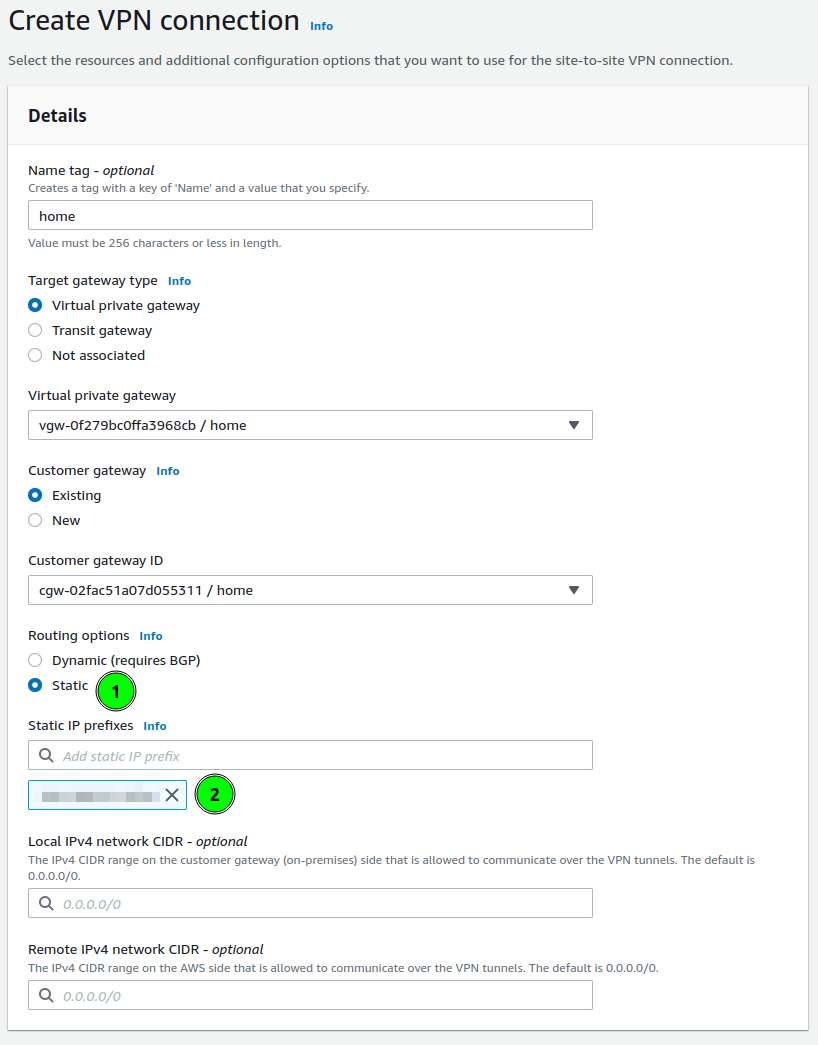
<p>This is the time to start defining VPN. Open the <strong>Site-to-Site VPN connection</strong> panel and click <strong>Create VPN Connection</strong>. The form will have 3 panels: details and tunnel options.</p>
<p><strong>Details</strong> start from defining the gateway on the VPC side. Choose <strong>Virtual private gateway</strong> and in the form select your VPG.</p>
<p>Next select <strong>Customer gateway</strong>. Here you define with which router the VPN will be established.</p>
<p>There is the last configuration to set: routing. It is a section where you can define which local networks the VPN will be used for. On the screenshot, I marked this as a point <strong>1</strong>.</p>
<p>AWS allows for two options: dynamic routing based on BGP, and statically defined. In my case, I am using static.
In the prefixes, I am putting my local network prefixes(like <code>192.168.1.0/24</code>). You are allowed to put multiple networks here.</p>
<p><img src="/posts/cloud/how-to-setup-aws-site-to-site-vpn-with-unifi-udm/create_vpn.png" alt=""></p>
<h3 id="configure-tunnel-options-">Configure Tunnel Options ⚙️</h3>
<p>Tunnel options allow defining the IPSec parameters. AWS creates 2 tunnels, to which you can connect and each of them you can configure differently. Or the same 🙂.</p>
<p>What I am always choosing is:</p>
<ul>
<li><strong>Encryption algorithms</strong>: AES-256 (for both phases)</li>
<li><strong>Integrity algorithms</strong>: SHA2-256, SHA2-384, SHA2-512</li>
<li><strong>DH groups</strong>: all above 14</li>
<li><strong>IKE Version</strong>: ikev2</li>
</ul>
<p>Those parameters will be crucial for setting up our Unifi router.</p>
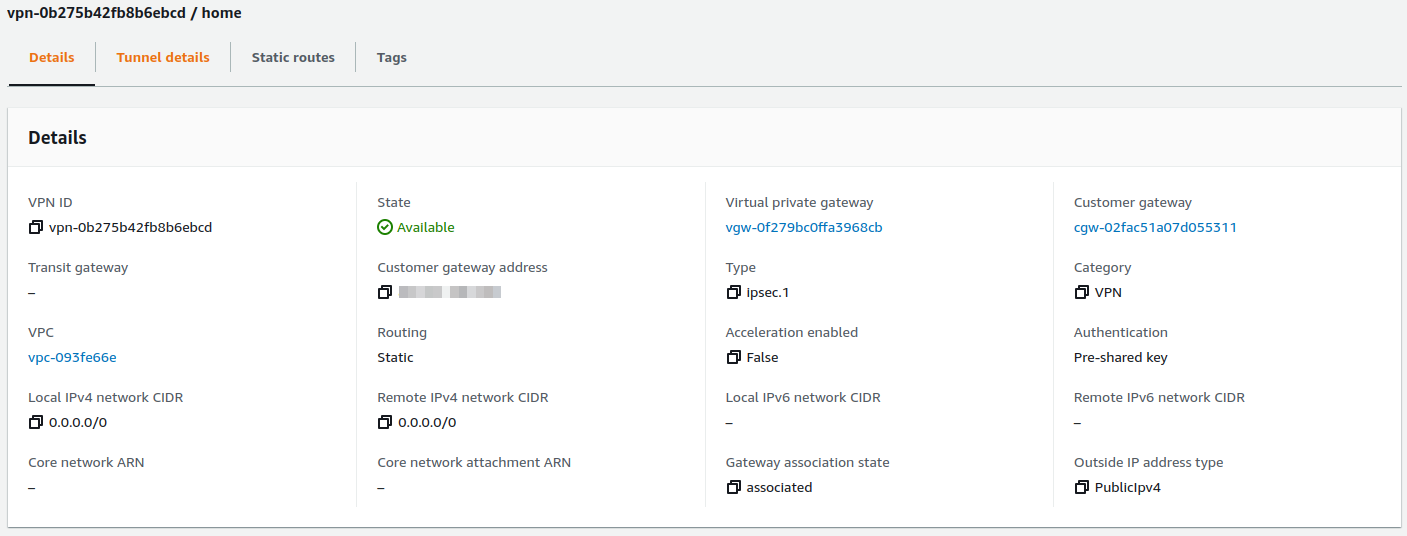
<p>When you finish these changes you can create the VPN and wait a few seconds. The VPN connection should be ready.
<img src="/posts/cloud/how-to-setup-aws-site-to-site-vpn-with-unifi-udm/vpn_ready.png" alt=""></p>
<h3 id="configure-vpc-routing-">Configure VPC Routing 🛣️</h3>
<p>Previously I mentioned that the Virtual Private Gateway state is not attached to any VPC. We can reassign the VPN connection between VPCs by changing attachments.</p>
<p>To attach go back to <strong>Virtual Private Gateway</strong> and select your VPG and in <strong>Actions</strong>, button find <strong>Attach to VPC</strong>. Select your VPC and your VPG should be available to configure routing on VPC.

<img src="/posts/cloud/how-to-setup-aws-site-to-site-vpn-with-unifi-udm/virtual_gateway_assigned.png.png" alt=""></p>
<p>On VPC the last thing to configure is routes. As we have assigned VPG, and networks from our home are known (configured on VPN with static routes), we can configure automated propagation of those rules to VPC route tables. To configure this perform:</p>
<ol>
<li>Go to <strong>Route tables</strong></li>
<li>Select routes assigned to VPC, or those which should have access to your home.</li>
<li>Select <strong>Actions</strong> button, and choose <strong>Edit route propagation</strong>,</li>
<li>Select Virtual private gateway</li>
</ol>
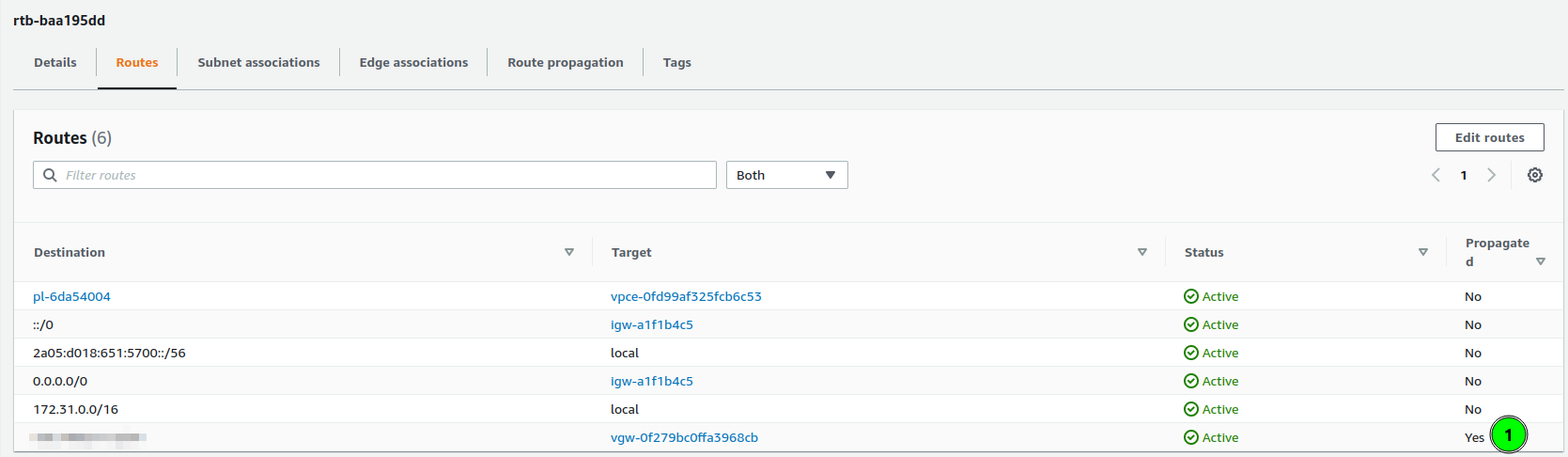
<p>After a few seconds, the new route should be added
<img src="/posts/cloud/how-to-setup-aws-site-to-site-vpn-with-unifi-udm/vpc_routes.png" alt="">
As you can see, the last route is &ldquo;Propagated&rdquo;, and its target is my virtual private gateway.</p>
<h2 id="setup-vpn-on-unifi-">Setup VPN on Unifi 🏠</h2>
<p>Having configured AWS VPC, the last part is to configure our router. In my home, I have Unifi Dream Machine, with the latest software (Network 7.1).</p>
<p>To create a VPN connection:</p>
<ul>
<li>Go to <strong>Settings</strong> &gt; <strong>Teleport &amp; VPN</strong>,</li>
<li>Scroll down to <strong>Site-to-Site VPN</strong> and click  <strong>Create</strong>,
<img src="/posts/cloud/how-to-setup-aws-site-to-site-vpn-with-unifi-udm/udm-ipsec.png" alt=""></li>
</ul>
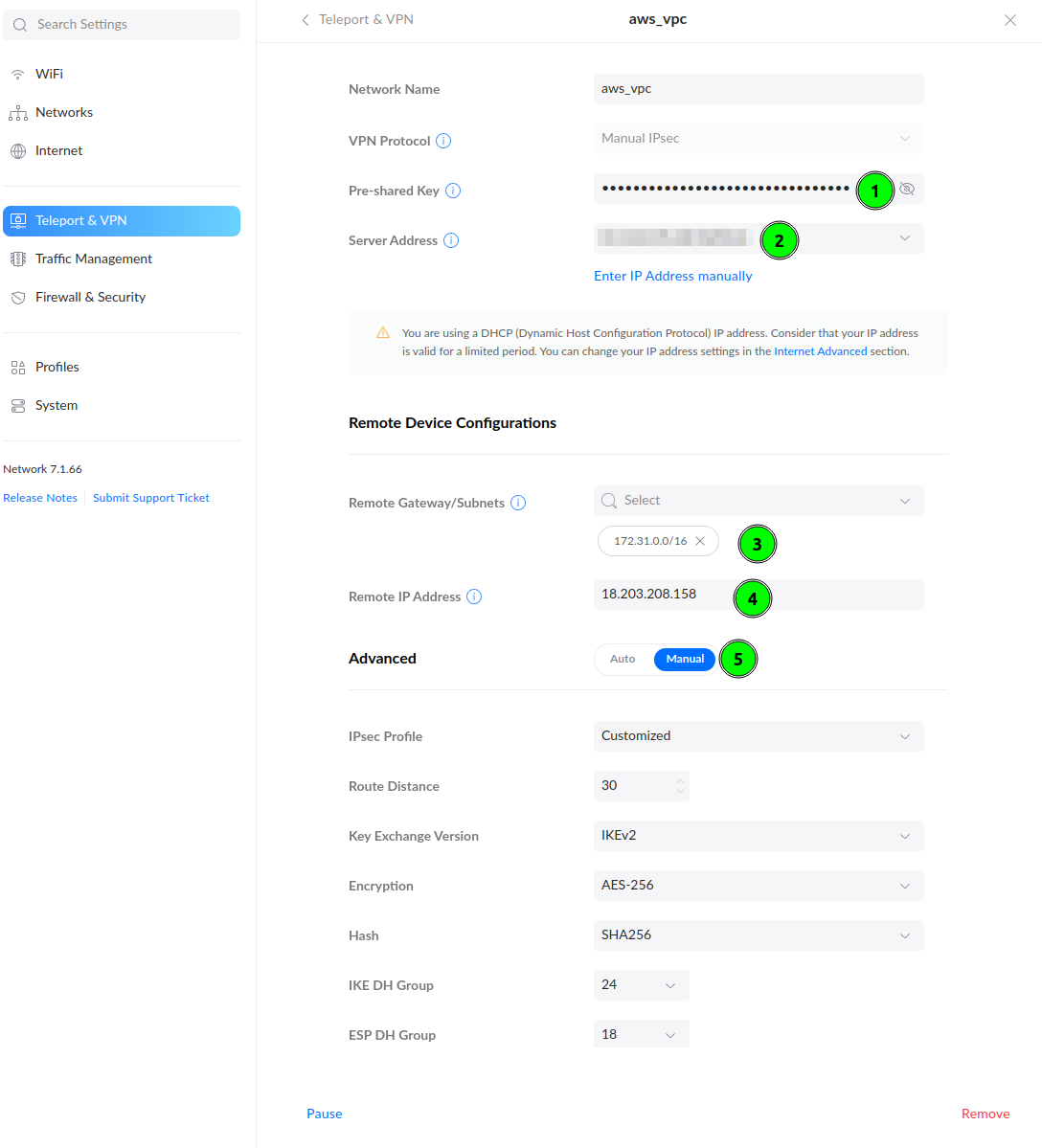
<p>Start filling out the form. The Pre-Shared Key you could configure in Tunnel Options. If you have skipped this, go to the AWS VPN tab, and click <strong>Download Configuration</strong>. In this file you will find the PSK to fill in point 1 and the <strong>Remote IP Address</strong> (point 4).
In the <strong>Remote Gateway/Subnets</strong>(point 3) put AWS VPC network addressing. In my case, it was <code>172.31.0.0/16</code>.</p>
<p>To align encryption options with <strong>Tunnel Options</strong> on AWS, select <strong>Manual</strong> in Advanced configuration and customize. Configure your parameters according to how you have configured them on AWS. I recommend using <strong>AES-256</strong> and higher DH Groups and use the above image as an example.</p>


<div class="alert success">
    <span><i data-feather="check-circle"></i></span>
    <span><strong>The VPN connection should be established ❤️</strong></span>
</div>

<h2 id="last-step---testing-">Last step - testing 🪛</h2>
<p>To check if you have a working VPN connection create an EC2 instance on this VPC.</p>


<div class="alert warning">
    <span><i data-feather="alert-triangle"></i></span>
    <span><strong>Ensure your Security group allows for your home network. You can allow access to a single port, protocol, or whole traffic.</strong></span>
</div>

<p>I have created an instance with IP <code>172.31.34.95</code>. This instance has a Security Group rule allowing for <strong>All Traffic</strong> from my home network.
When the VPN works and instance is up, a simple <code>ping</code> can prove that everything is configured:</p>
<div class="highlight"><pre tabindex="0" style="color:#f8f8f2;background-color:#272822;-moz-tab-size:4;-o-tab-size:4;tab-size:4;-webkit-text-size-adjust:none;"><code class="language-bash" data-lang="bash"><span style="display:flex;"><span>$ ping 172.31.34.95 -c <span style="color:#ae81ff">5</span>
</span></span><span style="display:flex;"><span>PING 172.31.34.95 <span style="color:#f92672">(</span>172.31.34.95<span style="color:#f92672">)</span> 56<span style="color:#f92672">(</span>84<span style="color:#f92672">)</span> bytes of data.
</span></span><span style="display:flex;"><span><span style="color:#ae81ff">64</span> bytes from 172.31.34.95: icmp_seq<span style="color:#f92672">=</span><span style="color:#ae81ff">1</span> ttl<span style="color:#f92672">=</span><span style="color:#ae81ff">63</span> time<span style="color:#f92672">=</span>38.1 ms
</span></span><span style="display:flex;"><span><span style="color:#ae81ff">64</span> bytes from 172.31.34.95: icmp_seq<span style="color:#f92672">=</span><span style="color:#ae81ff">2</span> ttl<span style="color:#f92672">=</span><span style="color:#ae81ff">63</span> time<span style="color:#f92672">=</span>38.2 ms
</span></span><span style="display:flex;"><span><span style="color:#ae81ff">64</span> bytes from 172.31.34.95: icmp_seq<span style="color:#f92672">=</span><span style="color:#ae81ff">3</span> ttl<span style="color:#f92672">=</span><span style="color:#ae81ff">63</span> time<span style="color:#f92672">=</span>36.4 ms
</span></span><span style="display:flex;"><span><span style="color:#ae81ff">64</span> bytes from 172.31.34.95: icmp_seq<span style="color:#f92672">=</span><span style="color:#ae81ff">4</span> ttl<span style="color:#f92672">=</span><span style="color:#ae81ff">63</span> time<span style="color:#f92672">=</span>38.3 ms
</span></span><span style="display:flex;"><span><span style="color:#ae81ff">64</span> bytes from 172.31.34.95: icmp_seq<span style="color:#f92672">=</span><span style="color:#ae81ff">5</span> ttl<span style="color:#f92672">=</span><span style="color:#ae81ff">63</span> time<span style="color:#f92672">=</span>38.1 ms
</span></span><span style="display:flex;"><span>
</span></span><span style="display:flex;"><span>--- 172.31.34.95 ping statistics ---
</span></span><span style="display:flex;"><span><span style="color:#ae81ff">5</span> packets transmitted, <span style="color:#ae81ff">5</span> received, 0% packet loss, time 4005ms
</span></span><span style="display:flex;"><span>rtt min/avg/max/mdev <span style="color:#f92672">=</span> 36.380/37.810/38.285/0.718 ms
</span></span></code></pre></div><blockquote>
<p>If you are not sure that you are pinging EC2 take a look on ping response times. On local networks they are much lower.</p>
</blockquote>
<h2 id="summary-">Summary ☑️</h2>
<p>Setting up VPN allows making your infrastructure secure. You don&rsquo;t have to expose ports on the public internet to have access to cloud machines.</p>
<h2 id="faq-">FAQ ❓</h2>
<p><strong>I have two network VLANs at home, should I configure some firewall rules if I don&rsquo;t want to allow access from one of them?</strong></p>
<p>Let&rsquo;s assume you have two networks: <code>home</code> and <code>guest</code>.  If the <code>guest</code> network should not have access to resources to VPN, on AWS VPN,  in <strong>Static IP Prefixes</strong> configuration you have to set only <code>home</code> network subnet.</p>
<p>Another thing are Security Groups, where we define allowed networks. If you will not set too wide network range, then it will also block access.</p>
]]></content><category scheme="https://6f95e4af.mjasion.pages.dev/tags/aws" term="aws" label="aws"/><category scheme="https://6f95e4af.mjasion.pages.dev/tags/vpn" term="vpn" label="vpn"/><category scheme="https://6f95e4af.mjasion.pages.dev/tags/unifi" term="unifi" label="unifi"/><category scheme="https://6f95e4af.mjasion.pages.dev/tags/networking" term="networking" label="networking"/></entry><entry><title type="html">How to configure parallelism in Terraform Cloud</title><link href="https://6f95e4af.mjasion.pages.dev/posts/cloud/how-to-set-parallelism-in-terraform-cloud/?utm_source=atom_feed" rel="alternate" type="text/html"/><link href="https://6f95e4af.mjasion.pages.dev/posts/cloud/how-to-enable-debug-in-terraform-cloud/?utm_source=atom_feed" rel="related" type="text/html" title="How to enable debug and trace logs in Terraform Cloud and Enterprise"/><id>https://6f95e4af.mjasion.pages.dev/posts/cloud/how-to-set-parallelism-in-terraform-cloud/</id><author><name>Marcin Jasion</name></author><published>2022-06-14T00:00:00+02:00</published><updated>2022-06-14T00:00:00+02:00</updated><content type="html"><![CDATA[<blockquote>Remote terraform execution runs on default parallelism value. There is a simple way to improve execution speed 4 times</blockquote><p>In my previous <a href="../how-to-enable-debug-in-terraform-cloud/">post</a> I showed how to enable debug logs. Today I want to present how to improve <code>terraform plan</code> and <code>terraform apply</code> speed by configuring <strong>parallelism</strong>.</p>
<p><a href="https://www.terraform.io/" target="_blank" rel="noopener">Terraform</a> by default runs <code>10</code> concurrent operations. To reduce execution time on plan or apply operation we can increase this parameter.</p>
<blockquote>
<p>By increasing <strong>parallelism</strong> you can hit the rate limit of your provider. Some cloud providers (like <a href="https://developers.cloudflare.com/terraform/advanced-topics/provider-customization/#increase-the-frequency-of-api-requests" target="_blank" rel="noopener">Cloudflare</a>) inform about the number of API requests allowed in a period of time. Hitting the limit can impact your deployments.</p>
</blockquote>
<h2 id="tfe_parallelism-variable"><code>TFE_PARALLELISM</code> variable</h2>
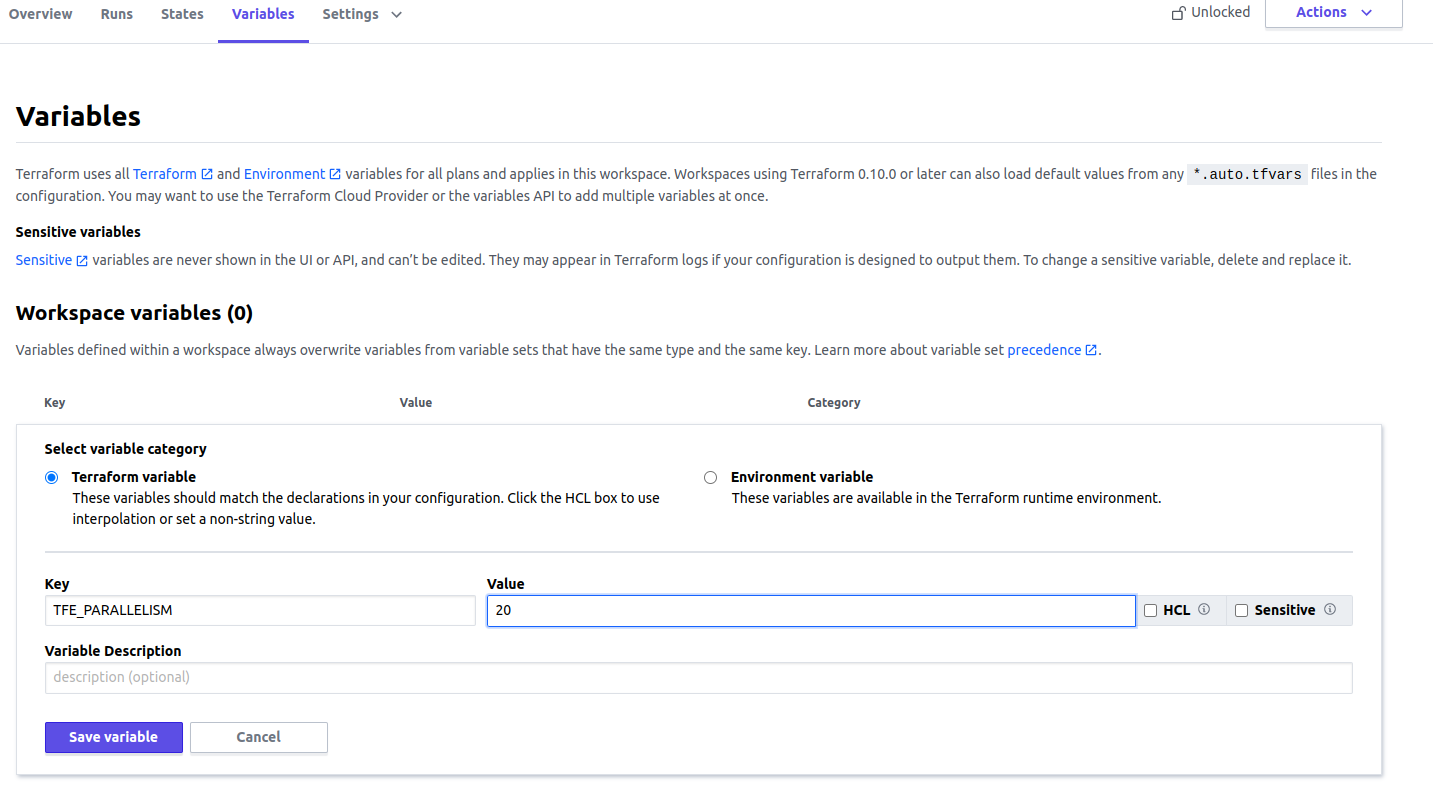
<p>The easiest way to increase parallelism in Terraform Cloud for Remote Execution is the <code>TFE_PARALLELISM</code> variable. It just requires a number. To set this you need to perform those steps:</p>
<ul>
<li>Select your workspace,</li>
<li>Go to <strong>Variables</strong> tab,</li>
<li>Add variable in <strong>Workspace variables</strong> panel and create <code>TFE_PARALLELISM</code> variable:
<img src="/posts/cloud/how-to-set-parallelism-in-terraform-cloud/workspace_tfe_parallelism.png" alt="Workspace TFE_PARALLELISM variable">
<blockquote>
<p>Ensure you have selected <strong>Environment variable</strong> button</p>
</blockquote>
</li>
</ul>
<p>The change should be available on next execution.</p>
<h2 id="manage-parallelism-for-each-stage-of-execution">Manage parallelism for each stage of execution</h2>
<p>Terraform CLI allows configuring parallelism differently per command (<code>terraform plan</code>, <code>terraform apply</code> or <code>terraform destroy</code>). In Terraform Cloud we can also do this. In these cases, use <code>TF_CLI_ARGS_plan=&quot;-parallelism=&lt;N&gt;&quot;</code> or <code>TF_CLI_ARGS_apply=&quot;-parallelism=&lt;N&gt;&quot;</code> environment variables instead of <code>TFE_PARALLELISM</code>.</p>
<p>I prefer this way because it allows being more granular. I want to run plan fast because it makes a request about every resource.</p>
<p>To set <code>TF_CLI_ARGS_plan=&quot;-parallelism=&lt;N&gt;&quot;</code> or <code>TF_CLI_ARGS_apply=&quot;-parallelism=&lt;N&gt;&quot;</code> parameters perform same steps as in instruction written above for <code>TFE_PARALLELISM</code>.</p>
<h2 id="manage-the-variables-in-a-single-place">Manage the variables in a single place</h2>
<p>I showed how to configure a variable per workspace. Terraform Cloud allows configuring a <strong>Variable set</strong> which can be attached to each workspace, so we don&rsquo;t need to repeat ourselves for each workspace.</p>
<p>To configure <strong>Variable set</strong> do:</p>
<ul>
<li>Go to your organization <strong>Settings</strong></li>
<li>Select <strong>Variable set</strong> tab and click button <strong>Create variable set</strong></li>
<li>In <strong>Variables</strong> panel you need to define your variables</li>
</ul>
<p>What is left is to attach the variable set to your workspace, or you can enable this set for all workspaces in the organization.</p>
<p><strong>Variables set</strong> has lower precedence than workspace variables. Definition of the same variable in workspace will be used in execution. <a href="https://www.terraform.io/cloud-docs/workspaces/variables#precedence" target="_blank" rel="noopener">Here</a> you can read more.</p>
]]></content><category scheme="https://6f95e4af.mjasion.pages.dev/tags/terraform" term="terraform" label="terraform"/><category scheme="https://6f95e4af.mjasion.pages.dev/tags/terraform-cloud" term="terraform-cloud" label="terraform-cloud"/><category scheme="https://6f95e4af.mjasion.pages.dev/tags/performance" term="performance" label="performance"/></entry><entry><title type="html">How to enable debug and trace logs in Terraform Cloud and Enterprise</title><link href="https://6f95e4af.mjasion.pages.dev/posts/cloud/how-to-enable-debug-in-terraform-cloud/?utm_source=atom_feed" rel="alternate" type="text/html"/><link href="https://6f95e4af.mjasion.pages.dev/posts/kubernetes/how-to-debug-istio-upstream-reset/?utm_source=atom_feed" rel="related" type="text/html" title="How to debug Istio Upstream Reset 502 UPE (old 503 UC)"/><id>https://6f95e4af.mjasion.pages.dev/posts/cloud/how-to-enable-debug-in-terraform-cloud/</id><author><name>Marcin Jasion</name></author><published>2022-06-10T00:00:00+02:00</published><updated>2022-06-10T00:00:00+02:00</updated><content type="html"><![CDATA[<blockquote>Remote terraform execution does not forward CLI parameters. This post covers how to do this.</blockquote><p><a href="https://cloud.hashicorp.com/products/terraform" target="_blank" rel="noopener">Terraform Cloud</a> is an application that helps teams use Terraform together. I am using it for side projects like my cloud infrastructure. Last time I had to see trace logs to find an issue with one of the managed resources.</p>
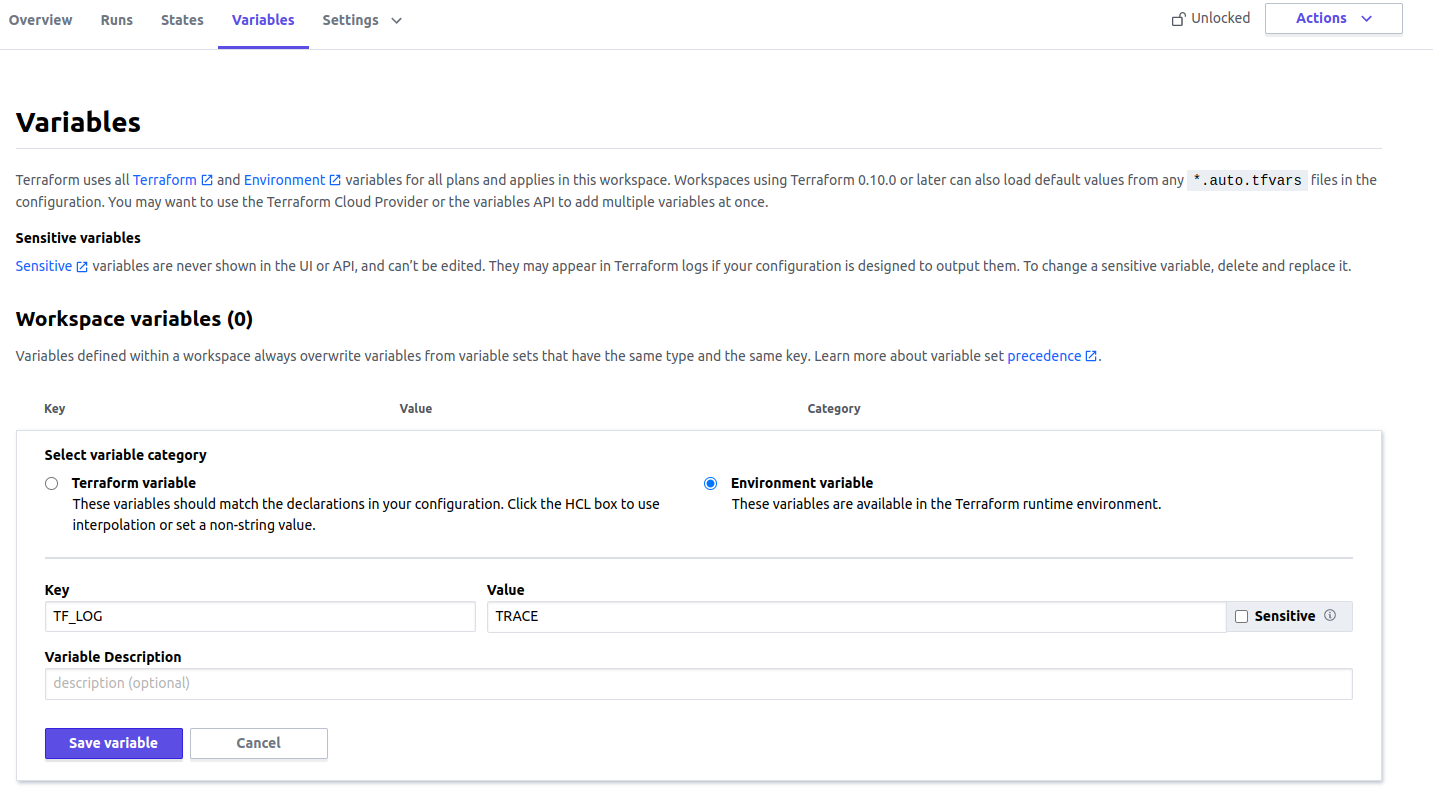
<p><a href="https://www.terraform.io/" target="_blank" rel="noopener">Terraform</a> has detailed logs which can be enabled by setting the <code>TF_LOG</code> environment variable to any value. This will cause detailed logs to appear on execution.</p>
<h2 id="enabling-verbose-logging-in-cli">Enabling verbose logging in CLI</h2>
<p>You can set <code>TF_LOG</code> to one of the log levels <code>TRACE</code>, <code>DEBUG</code>, <code>INFO</code>, <code>WARN</code> or <code>ERROR</code> to change the verbosity of the logs. You can set this variable in two ways. First option is to set variable for shell session:</p>
<div class="highlight"><pre tabindex="0" style="color:#f8f8f2;background-color:#272822;-moz-tab-size:4;-o-tab-size:4;tab-size:4;-webkit-text-size-adjust:none;"><code class="language-bash" data-lang="bash"><span style="display:flex;"><span>$ export TF_LOG<span style="color:#f92672">=</span>TRACE
</span></span><span style="display:flex;"><span>$ terraform plan
</span></span></code></pre></div><p>Second option is to change variable before command execution</p>
<div class="highlight"><pre tabindex="0" style="color:#f8f8f2;background-color:#272822;-moz-tab-size:4;-o-tab-size:4;tab-size:4;-webkit-text-size-adjust:none;"><code class="language-bash" data-lang="bash"><span style="display:flex;"><span>$ TF_LOG<span style="color:#f92672">=</span>TRACE terraform plan
</span></span></code></pre></div><h2 id="enabling-logging-in-terraform-cloud">Enabling logging in Terraform Cloud</h2>
<p>If this run is in Terraform Cloud or Terraform Enterprise with Remote Execution, perform these steps:</p>
<ul>
<li>Select your workspace,</li>
<li>Go to <strong>Variables</strong> tab,</li>
<li>Add variable in <strong>Workspace variables</strong> panel and create <code>TF_LOG</code> variable:
<img src="/posts/cloud/how-to-enable-debug-in-terraform-cloud/workspace_variables.png" alt="Workspace Variables">
<blockquote>
<p>Ensure you have selected <strong>Environment variable</strong> button</p>
</blockquote>
</li>
<li>Perform the run that you want to trace</li>
</ul>
<h3 id="another-option-is-to-enable-local-execution">Another option is to enable local execution</h3>
<p>If you are working on your own project, it will be much more convenient to disable Remote Execution and execute the run locally. Go to workspace <strong>Settings</strong> and in <strong>Execution Mode</strong> panel switch the button to <strong>Local</strong>. Then you can run plan from your local machine.</p>
<hr>
<p>Once the issue is resolved, unset the <code>TF_LOG</code> environment variable to disable the enhanced logging.</p>
]]></content><category scheme="https://6f95e4af.mjasion.pages.dev/tags/terraform" term="terraform" label="terraform"/><category scheme="https://6f95e4af.mjasion.pages.dev/tags/terraform-cloud" term="terraform-cloud" label="terraform-cloud"/><category scheme="https://6f95e4af.mjasion.pages.dev/tags/debugging" term="debugging" label="debugging"/></entry><entry><title type="html">How to debug Istio Upstream Reset 502 UPE (old 503 UC)</title><link href="https://6f95e4af.mjasion.pages.dev/posts/kubernetes/how-to-debug-istio-upstream-reset/?utm_source=atom_feed" rel="alternate" type="text/html"/><id>https://6f95e4af.mjasion.pages.dev/posts/kubernetes/how-to-debug-istio-upstream-reset/</id><author><name>Marcin Jasion</name></author><published>2022-04-25T00:00:00+02:00</published><updated>2022-04-25T00:00:00+02:00</updated><content type="html"><![CDATA[<blockquote>Istio can reset processing the request. This blog post shows how to analyze the issue if logs do not help</blockquote><p><a href="https://istio.io" target="_blank" rel="noopener">Istio</a> is a complex system. For the applications, the main component is the sidecar container Istio-Proxy, which proxies all traffic from all containers in Pod. And this can lead to some issues.</p>
<p>This post describes one of the most complicated problems I have encountered in my career.</p>
<h2 id="the-problem---connection-reset-">The problem - Connection Reset 🐛</h2>
<p>During Istio rollout on a huge system, with more than 40 different microservices, on a single endpoint, QA engineers found a bug. It was a POST endpoint, which was returning chunked data.</p>
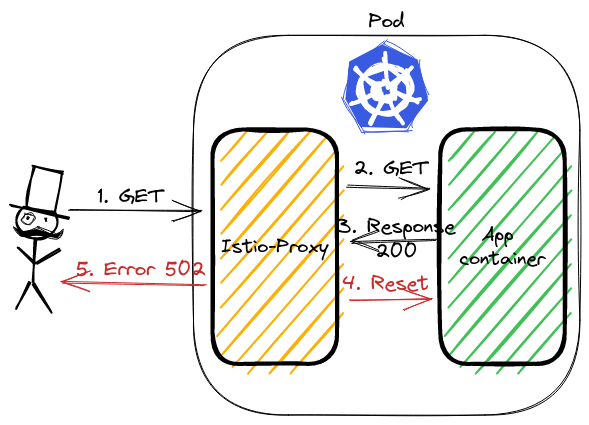
<p>Istio was returning error 502, in logs an additional flag was visible: <code>upstream_reset_before_response_started</code>. The application logs confirmed that the result was correct.</p>
<blockquote>
<p>In legacy Istio versions of the presented problem Istio were returning <code>503</code> error with <code>UC</code> flag.</p>
</blockquote>
<h2 id="analyzing-issue-">Analyzing issue ⛏️</h2>
<p>Let&rsquo;s see the <code>curl</code> response and look at Istio-proxy logs:</p>
<div class="highlight"><pre tabindex="0" style="color:#f8f8f2;background-color:#272822;-moz-tab-size:4;-o-tab-size:4;tab-size:4;-webkit-text-size-adjust:none;"><code class="language-bash" data-lang="bash"><span style="display:flex;"><span>kubectl exec -it curl-0 -- curl http://http-chunked:8080/wrong -v
</span></span><span style="display:flex;"><span>&lt; HTTP/1.1 <span style="color:#ae81ff">502</span> Bad Gateway
</span></span><span style="display:flex;"><span>&lt; content-length: <span style="color:#ae81ff">87</span>
</span></span><span style="display:flex;"><span>&lt; content-type: text/plain
</span></span><span style="display:flex;"><span>&lt; date: Sun, <span style="color:#ae81ff">24</span> Apr <span style="color:#ae81ff">2022</span> 12:28:28 GMT
</span></span><span style="display:flex;"><span>&lt; server: istio-envoy
</span></span><span style="display:flex;"><span>&lt; x-envoy-decorator-operation: http-chunked.default.svc.cluster.local:8080/*
</span></span><span style="display:flex;"><span>upstream connect error or disconnect/reset before headers. reset reason: protocol error
</span></span><span style="display:flex;"><span>
</span></span><span style="display:flex;"><span>$ kubectl logs http-chunked-0 -c istio-proxy
</span></span><span style="display:flex;"><span><span style="color:#f92672">[</span>2022-04-24T12:23:37.047Z<span style="color:#f92672">]</span> <span style="color:#e6db74">&#34;GET /wrong HTTP/1.1&#34;</span> <span style="color:#ae81ff">502</span> UPE upstream_reset_before_response_started<span style="color:#f92672">{</span>protocol_error<span style="color:#f92672">}</span> - <span style="color:#e6db74">&#34;-&#34;</span> <span style="color:#ae81ff">0</span> <span style="color:#ae81ff">87</span> <span style="color:#ae81ff">1001</span> - <span style="color:#e6db74">&#34;-&#34;</span> <span style="color:#e6db74">&#34;curl/7.80.0&#34;</span> <span style="color:#e6db74">&#34;3987a4cb-2e0e-4de6-af66-7e3447600c73&#34;</span> <span style="color:#e6db74">&#34;http-chunked:8080&#34;</span> <span style="color:#e6db74">&#34;10.244.0.17:8080&#34;</span> inbound|8080<span style="color:#f92672">||</span> 127.0.0.6:39063 10.244.0.17:8080 10.244.0.14:35500 - default
</span></span></code></pre></div><h2 id="time-for-spying-">Time for spying 🕵🏻‍♂️</h2>
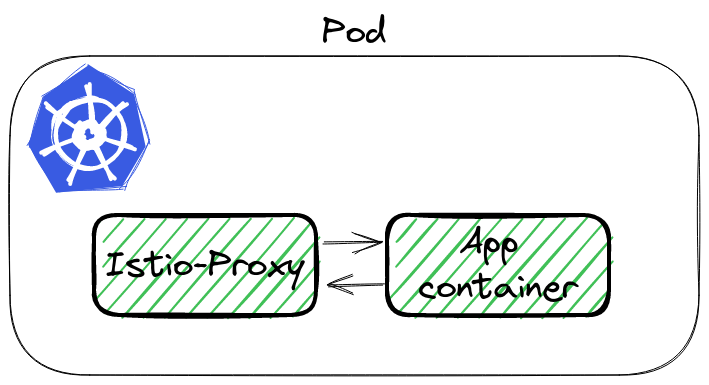
<p>To analyze the traffic we can use <code>tcpdump</code> and Wireshark. Istio-proxy runs as a sidecar, which routes whole incoming and outgoing traffic to pod through own proxy.
<img src="/posts/kubernetes/how-to-debug-istio-upstream-reset/istio-pod.png" alt="Istio Pod"></p>
<p>To sniff traffic there are 3 ways:</p>
<ol>
<li>Running tcpdump in <code>istio-proxy</code> container,</li>
<li>Using <code>kubectl</code> plugin <code>ksniff</code> - a plugin to kubectl to dump packets from pod, <a href="https://github.com/eldadru/ksniff" target="_blank" rel="noopener">github repo</a>,</li>
<li>Adding additional container to pod, with <code>root</code> permission and <code>tcpdump</code>  installed,</li>
</ol>
<p>The first option will not work by default, because <code>istio-proxy</code> runs without root permission. The third is the backup if 1 and 2 would not work. Let&rsquo;s try <a href="https://github.com/eldadru/ksniff" target="_blank" rel="noopener">ksniff</a>.</p>
<h3 id="what-is-ksniff-">What is ksniff 🛠️</h3>
<p><code>ksniff</code> in three words is a plugin that:</p>
<ul>
<li>figures  out what node is running pod with an app,</li>
<li>deploys an own pod with an affinity to that node, bound to the host network,</li>
<li>opens Wireshark on your laptop with a packet stream from the application.</li>
</ul>
<p>Let&rsquo;s execute it to sniff our application:</p>
<div class="highlight"><pre tabindex="0" style="color:#f8f8f2;background-color:#272822;-moz-tab-size:4;-o-tab-size:4;tab-size:4;-webkit-text-size-adjust:none;"><code class="language-bash" data-lang="bash"><span style="display:flex;"><span>kubectl sniff http-chunked-0 -c istio-proxy -p -f <span style="color:#e6db74">&#39;-i lo&#39;</span> -n default
</span></span></code></pre></div><blockquote>
<p><strong>Important parameters</strong></p>
<ul>
<li><code>-p</code> is a parameter to support sniffing even if the pod is non-privileged. See <a href="https://github.com/eldadru/ksniff#non-privileged-and-scratch-pods" target="_blank" rel="noopener">docs</a>,</li>
<li><code>-f '-i lo'</code> passes filter to tcpdump, we want to sniff localhost interface inside the Pod.</li>
</ul>
</blockquote>
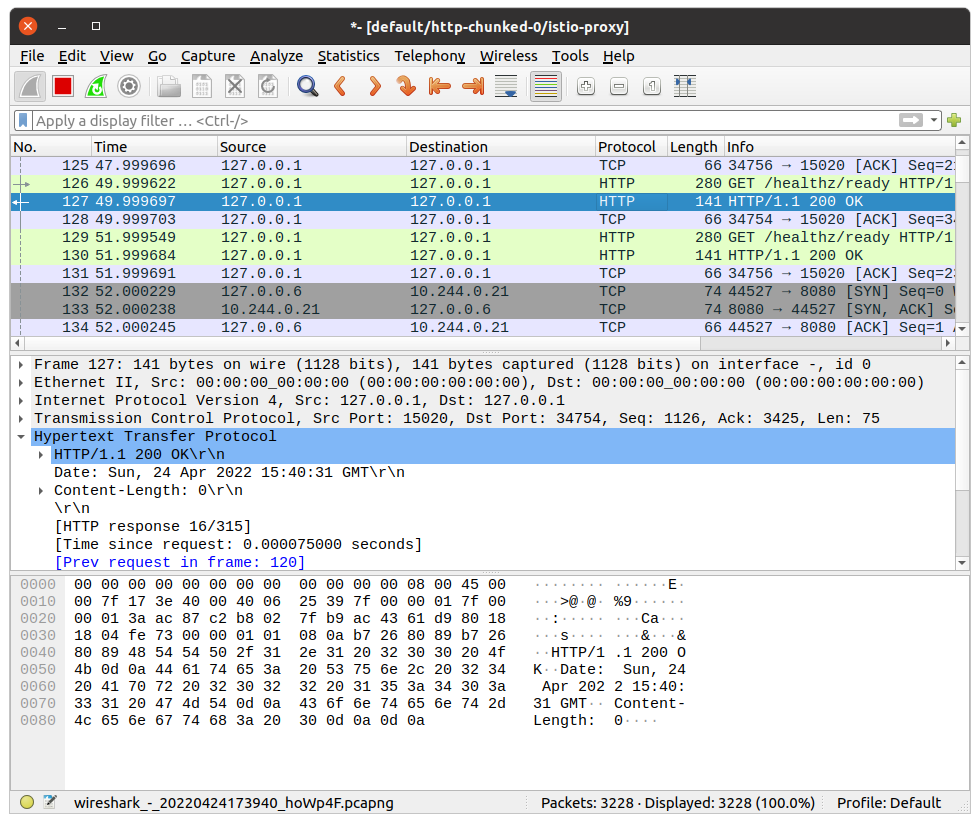
<p>If there is no issue, our system has Wireshark in <code>PATH</code>, <code>ksniff</code> should open a new window
<img src="/posts/kubernetes/how-to-debug-istio-upstream-reset/wireshark_init.png" alt="Wireshark"></p>
<h3 id="finding-the-root-cause-">Finding the root cause 🔎</h3>
<p>Wireshark will continuously follow with new packet records. It makes it hard to figure out our particular call. We can use filters to help with searching. Knowing the request path, method, response code - we can use it to find our packet using filter:</p>
<div class="highlight"><pre tabindex="0" style="color:#f8f8f2;background-color:#272822;-moz-tab-size:4;-o-tab-size:4;tab-size:4;-webkit-text-size-adjust:none;"><code class="language-bash" data-lang="bash"><span style="display:flex;"><span>http.request.uri <span style="color:#f92672">==</span> <span style="color:#e6db74">&#34;/wrong&#34;</span>
</span></span></code></pre></div><p>It shows only a single packet, our request. Wireshark allows to show the whole TCP conversation:</p>
<ul>
<li>click right click on the packet,</li>
<li>go to <code>Conversation Filter</code>,</li>
<li>select <code>TCP</code>.</li>
</ul>
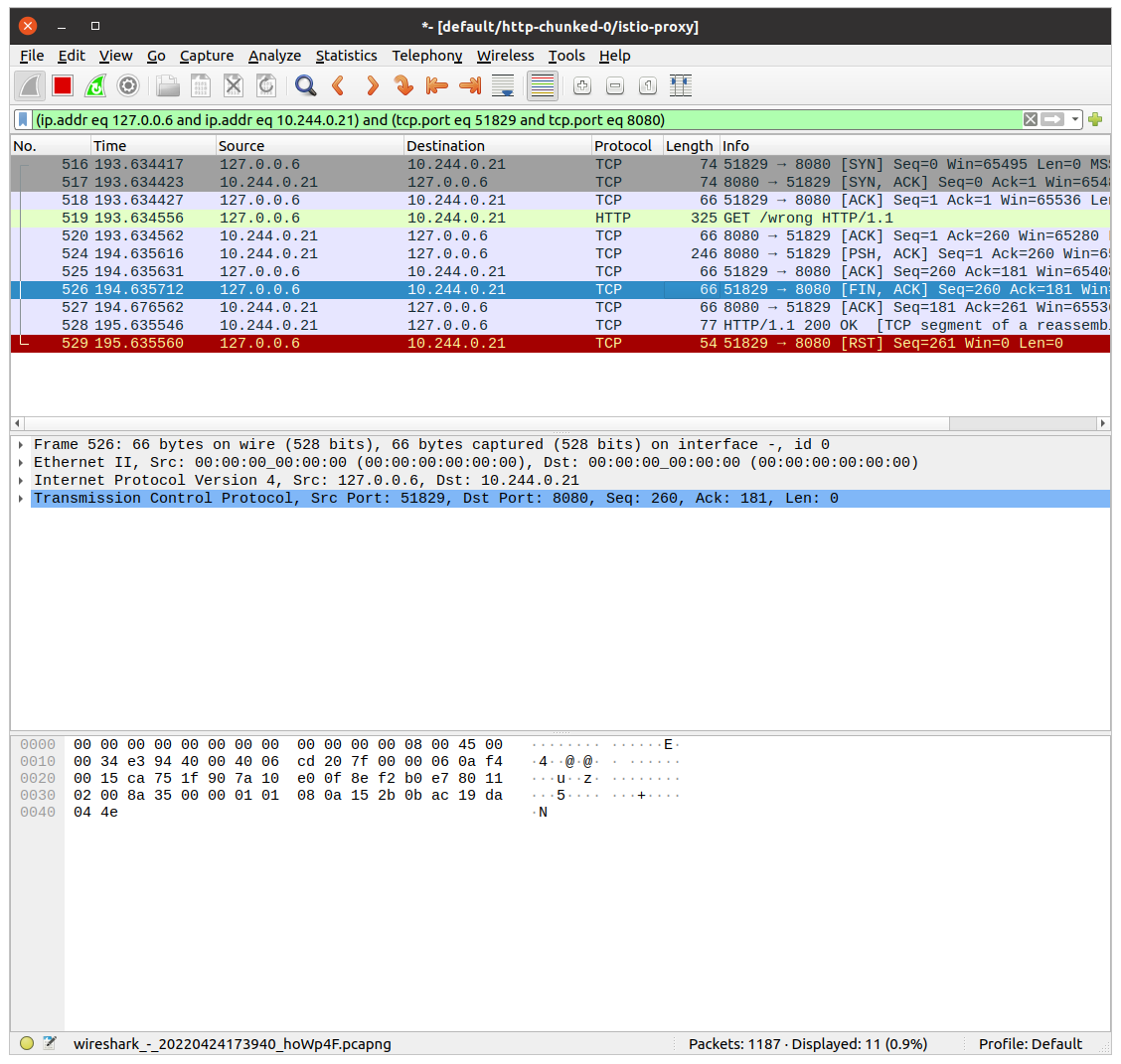
<p>Wireshark will write a filter to show the whole communication between istio-proxy container and the application container!</p>
<p><img src="/posts/kubernetes/how-to-debug-istio-upstream-reset/wireshark_convesation_filter.png" alt="Wireshark - Filtering the conversation"></p>
<p>Let&rsquo;s see the above image. The first 3 records are the three-way handshake packets. Later is our GET request.  The most interesting happens in the last two packets. Application container returns response HTTP 200 OK. <code>istio-proxy</code> then closes the connection with <code>RST</code> packet.</p>
<p><img src="/posts/kubernetes/how-to-debug-istio-upstream-reset/app_reset.png" alt="Wireshark - Found RST Packet"></p>
<p>This is what we saw in the logs. The flag was <code>upstream_reset_before_response_started{protocol_error}</code>. But why? This still does not explain.</p>
<h3 id="swiss-knife-by-wireshark-">Swiss knife by Wireshark 🪛</h3>
<p>It is hard to read the HTTP protocol from multiple packet bodies. But Wireshark also has a solution for that. We can see data from L7, the application one. In our case, it is the HTTP protocol.</p>
<p>Click with the right mouse on a single packet, go to the <code>Follow</code> tab, and select <code>TCP Stream</code>:</p>
<p><img src="/posts/kubernetes/how-to-debug-istio-upstream-reset/wireshark_tcp_stream.png" alt="Wireshark - Filtering TCP stream"></p>
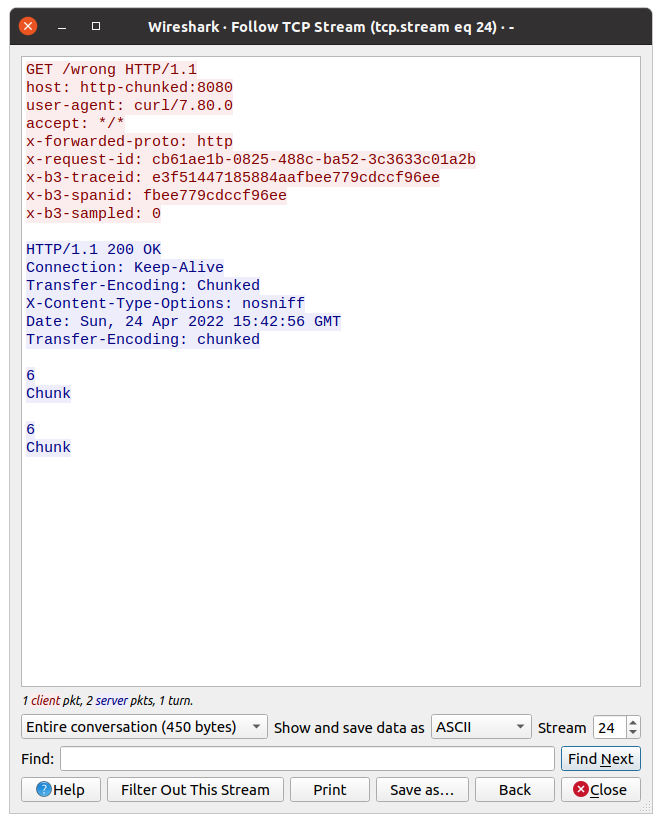
<p>Now we can check what the request from <code>istio-proxy</code> looked like, and what was the response from the app.
Do you have an idea from the above picture?</p>
<p>Look closer at the response, there is a double <code>Transfer-Encoding</code> header. One starts from uppercase, the second one does not.</p>
<h3 id="double-transfer-encoding-header---what-does-it-mean">Double transfer-encoding header - what does it mean❔</h3>
<p>Searching over Istio issues I found <a href="https://github.com/istio/istio/issues/24753#issuecomment-656380098" target="_blank" rel="noopener">this answer</a>. The most important are the first 2 points:</p>
<blockquote>
<ol>
<li>two <code>transfer-encoding: chunked</code> is equivalent to <code>transfer-encoding: chunked, chunked</code> as per RFC,</li>
<li><code>transfer-encoding: chunked, chunked</code> doesn&rsquo;t have the same semantic as <code>transfer-encoding: chunked</code></li>
</ol>
</blockquote>
<p>Why the response was taken as double-chunked? According to <a href="https://datatracker.ietf.org/doc/html/rfc7230#section-4" target="_blank" rel="noopener">Transfer Codings in Section 4</a>, transfer-coding names <strong>are case-insensitive</strong>.</p>
<h2 id="summary-">Summary 📓</h2>
<p>As you see, Istio stands as a guard 👮‍♂️ of the HTTP protocol. If the app is returning a double-chunked response, then Istio requires it, otherwise, it rejects processing the request. <code>curl</code> ignores this inconsistency.</p>
<p>This issue was one of the most difficult tasks, which I ever had :-)</p>
<h2 id="infrastructure-to-reproduce-and-example-app-">Infrastructure to reproduce and example app 🏭</h2>
<p>In <a href="https://github.com/mjasion/istio-upstream-reset" target="_blank" rel="noopener">Github repository</a> I created example infrastructure to reproduce the problem.</p>
<p>Bootstrap of the infrastructure installs ArgoCD, Istio and the App. The sample app exposes two endpoints:</p>
<ul>
<li><code>/correct</code> - endpoint, which creates a streamed response,</li>
<li><code>/wrong</code> - is doing same as above, but additionally it set value of the <code>Transfer-Encoding</code> header to <code>Chunked</code>(uppercase).</li>
</ul>
<hr>
<p><em>I would like to thank <a href="https://www.linkedin.com/in/przemyslaw-ozimkiewicz/" target="_blank" rel="noopener">Przemysław</a> for his help and for showing me how to use Wireshark efficiently during this issue.🤝🏻</em></p>
]]></content><category scheme="https://6f95e4af.mjasion.pages.dev/tags/istio" term="istio" label="istio"/><category scheme="https://6f95e4af.mjasion.pages.dev/tags/kubernetes" term="kubernetes" label="kubernetes"/><category scheme="https://6f95e4af.mjasion.pages.dev/tags/debugging" term="debugging" label="debugging"/><category scheme="https://6f95e4af.mjasion.pages.dev/tags/networking" term="networking" label="networking"/></entry><entry><title type="html">Kind - Kubernetes IN Docker</title><link href="https://6f95e4af.mjasion.pages.dev/notes/k8s/kind/?utm_source=atom_feed" rel="alternate" type="text/html"/><id>https://6f95e4af.mjasion.pages.dev/notes/k8s/kind/</id><published>2022-04-21T18:00:00+00:00</published><updated>2022-04-21T18:00:00+00:00</updated><content type="html"><![CDATA[<!-- Variable -->
<div class="note-card ">
    <div class="item">
        <h5 class="note-title"><span>Kind - mount resolv.conf to skip systemd-resolved</span></h5>
        
            <div class="card">
                <div class="card-body"><p>By default Kind uses system <code>/etc/resolv.conf</code>. This points to <code>systemd-resolved</code>  service and some queries might fail. You can mount your network DNS configuration.</p>
<p>Save below config in <code>kind-cluster.yaml</code>:</p>
<div class="highlight"><pre tabindex="0" style="color:#f8f8f2;background-color:#272822;-moz-tab-size:4;-o-tab-size:4;tab-size:4;-webkit-text-size-adjust:none;"><code class="language-yaml" data-lang="yaml"><span style="display:flex;"><span><span style="color:#f92672">kind</span>: <span style="color:#ae81ff">Cluster</span>
</span></span><span style="display:flex;"><span><span style="color:#f92672">apiVersion</span>: <span style="color:#ae81ff">kind.x-k8s.io/v1alpha4</span>
</span></span><span style="display:flex;"><span><span style="color:#f92672">nodes</span>:
</span></span><span style="display:flex;"><span>- <span style="color:#f92672">role</span>: <span style="color:#ae81ff">control-plane</span>
</span></span><span style="display:flex;"><span>  <span style="color:#f92672">extraMounts</span>:
</span></span><span style="display:flex;"><span>  - <span style="color:#f92672">hostPath</span>: <span style="color:#ae81ff">/run/systemd/resolve/resolv.conf</span>
</span></span><span style="display:flex;"><span>    <span style="color:#f92672">containerPath</span>: <span style="color:#ae81ff">/etc/resolv.conf</span>
</span></span></code></pre></div><p>and run the <code>kind</code>:</p>
<div class="highlight"><pre tabindex="0" style="color:#f8f8f2;background-color:#272822;-moz-tab-size:4;-o-tab-size:4;tab-size:4;-webkit-text-size-adjust:none;"><code class="language-bash" data-lang="bash"><span style="display:flex;"><span>$ kind create cluster --config kind-cluster.yaml
</span></span></code></pre></div><p>Control-plane node should use your network DNS now.</p>
</div>
            </div>
        
    </div>
</div>

]]></content></entry><entry><title type="html">Deploy your first blockchain contract to Ethereum</title><link href="https://6f95e4af.mjasion.pages.dev/posts/development/first-blockchain-contract/?utm_source=atom_feed" rel="alternate" type="text/html"/><id>https://6f95e4af.mjasion.pages.dev/posts/development/first-blockchain-contract/</id><author><name>Marcin Jasion</name></author><published>2022-04-09T10:00:00+00:00</published><updated>2022-04-09T10:00:00+00:00</updated><content type="html"><![CDATA[<blockquote>Step by step guide to deploy first contract on Ethereum blockchain</blockquote><h2 id="first-contract---pet-owners">First contract - Pet owners</h2>
<p>I am learning blockchain and smart contracts. This post will be my note on how I am starting my journey into blockchain technology.</p>
<p>In this example I will create a contract for storing who is owning a Pet.</p>
<h2 id="development">Development</h2>
<div class="highlight"><pre tabindex="0" style="color:#f8f8f2;background-color:#272822;-moz-tab-size:4;-o-tab-size:4;tab-size:4;-webkit-text-size-adjust:none;"><code class="language-solidity" data-lang="solidity"><span style="display:flex;"><span><span style="color:#75715e">// SPDX-License-Identifier: MIT
</span></span></span><span style="display:flex;"><span><span style="color:#66d9ef">pragma solidity</span> <span style="color:#f92672">^</span><span style="color:#ae81ff">0</span>.<span style="color:#ae81ff">8</span>.<span style="color:#ae81ff">0</span>; <span style="color:#75715e">//build contract on top of Solidity &gt;=0.8.0 and &lt;0.9.0
</span></span></span><span style="display:flex;"><span>
</span></span><span style="display:flex;"><span><span style="color:#66d9ef">contract</span> <span style="color:#a6e22e">PetOwner</span> {
</span></span><span style="display:flex;"><span>    <span style="color:#66d9ef">mapping</span> (<span style="color:#66d9ef">string</span> <span style="color:#f92672">=&gt;</span> Pet) <span style="color:#66d9ef">public</span> petOwners;
</span></span><span style="display:flex;"><span>
</span></span><span style="display:flex;"><span>    <span style="color:#66d9ef">struct</span> <span style="color:#a6e22e">Pet</span> {
</span></span><span style="display:flex;"><span>        <span style="color:#66d9ef">string</span> name;
</span></span><span style="display:flex;"><span>        <span style="color:#66d9ef">string</span> petType;
</span></span><span style="display:flex;"><span>    }
</span></span><span style="display:flex;"><span>
</span></span><span style="display:flex;"><span>    <span style="color:#66d9ef">function</span> <span style="color:#a6e22e">addPetOwner</span>(<span style="color:#66d9ef">string</span> <span style="color:#66d9ef">memory</span> ownerName, <span style="color:#66d9ef">string</span> <span style="color:#66d9ef">memory</span> _name, <span style="color:#66d9ef">string</span> <span style="color:#66d9ef">memory</span> _petType) <span style="color:#66d9ef">public</span> {
</span></span><span style="display:flex;"><span>        petOwners[ownerName] <span style="color:#f92672">=</span> Pet({name<span style="color:#f92672">:</span> _name, petType<span style="color:#f92672">:</span> _petType});
</span></span><span style="display:flex;"><span>    }
</span></span><span style="display:flex;"><span>
</span></span><span style="display:flex;"><span>}
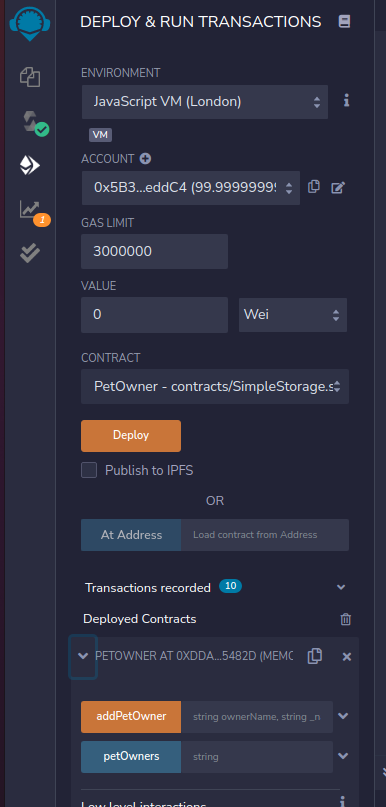
</span></span></code></pre></div><p>Put it in the Remix IDE: <a href="https://remix.ethereum.org/" target="_blank" rel="noopener">https://remix.ethereum.org/</a>. It should compile and we can deploy it on the local environment:</p>
<p><img src="/posts/development/first-blockchain-contract/deploy_smart_contract.png" alt="Deploy contract"></p>
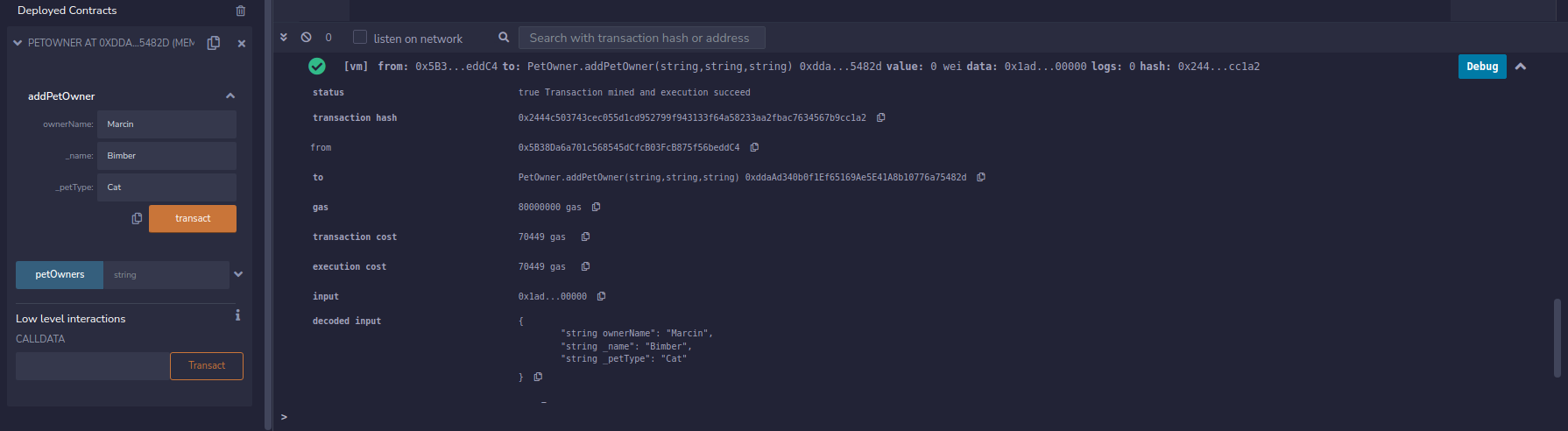
<p>When we have contract deployed we can create example contract ownership</p>
<p><img src="/posts/development/first-blockchain-contract/create_test_transaction.png" alt="Test Transaction"></p>
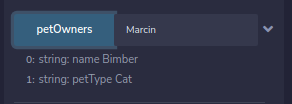
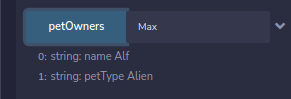
<p>and ask <code>petOwners</code> field for information which Pet is owned by <code>Marcin</code>.</p>
<p><img src="/posts/development/first-blockchain-contract/check_test_transaction.png" alt="Test check"></p>
<h2 id="lets-deploy-it-to-ethereum-test-network">Let&rsquo;s deploy it to Ethereum test network</h2>
<p>Ethereum allows testing our contract on test networks. For this example I will use Rinkeby. This is a free network for testing smart contracts.</p>
<blockquote>
<p>I am not covering how to install Metamask. Always remember to not share <strong>private key</strong> and <strong>seed</strong>
You can always create a new Metamask identity for your tests.</p>
</blockquote>
<ol>
<li>Switch the Remix Environment from <code>Javascript VM</code> to <code>Injected Web3</code></li>
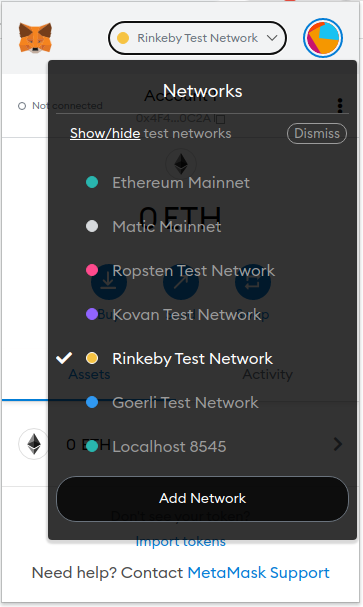
<li>Connect your Metamask. Ensure you have chosen Rinkeby network
<img src="/posts/development/first-blockchain-contract/metamask_rinkeby.png" alt="Metamask Rinkeby Network"></li>
<li>If you don&rsquo;t have any <code>ETH</code> coins you can use this Faucet to grab some: <a href="https://faucets.chain.link/rinkeby" target="_blank" rel="noopener">https://faucets.chain.link/rinkeby</a></li>
<li>Click deploy. You will be asked by Metamask to confirm the transaction: <a href="https://rinkeby.etherscan.io/tx/0x60ad0e4b25ba4dadef1410d766222b30815fe9e6bc7168cd6cd0f205bb4d90e3" target="_blank" rel="noopener">Contract deployment transaction</a></li>
</ol>
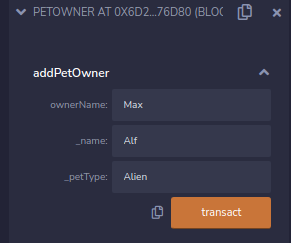
<p>Now I can test my contract. I fill the data
<img src="/posts/development/first-blockchain-contract/rinkeby-example-data.png" alt=""></p>
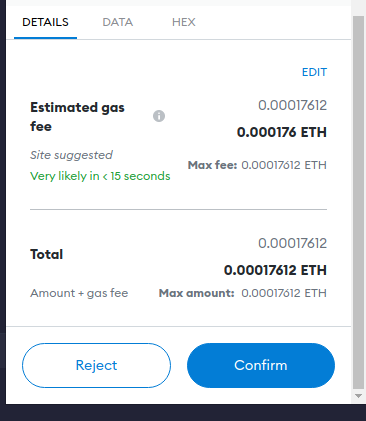
<p>And we will be asked again for confirming the transaction
<img src="/posts/development/first-blockchain-contract/metamask-example-contract.png" alt="">.</p>
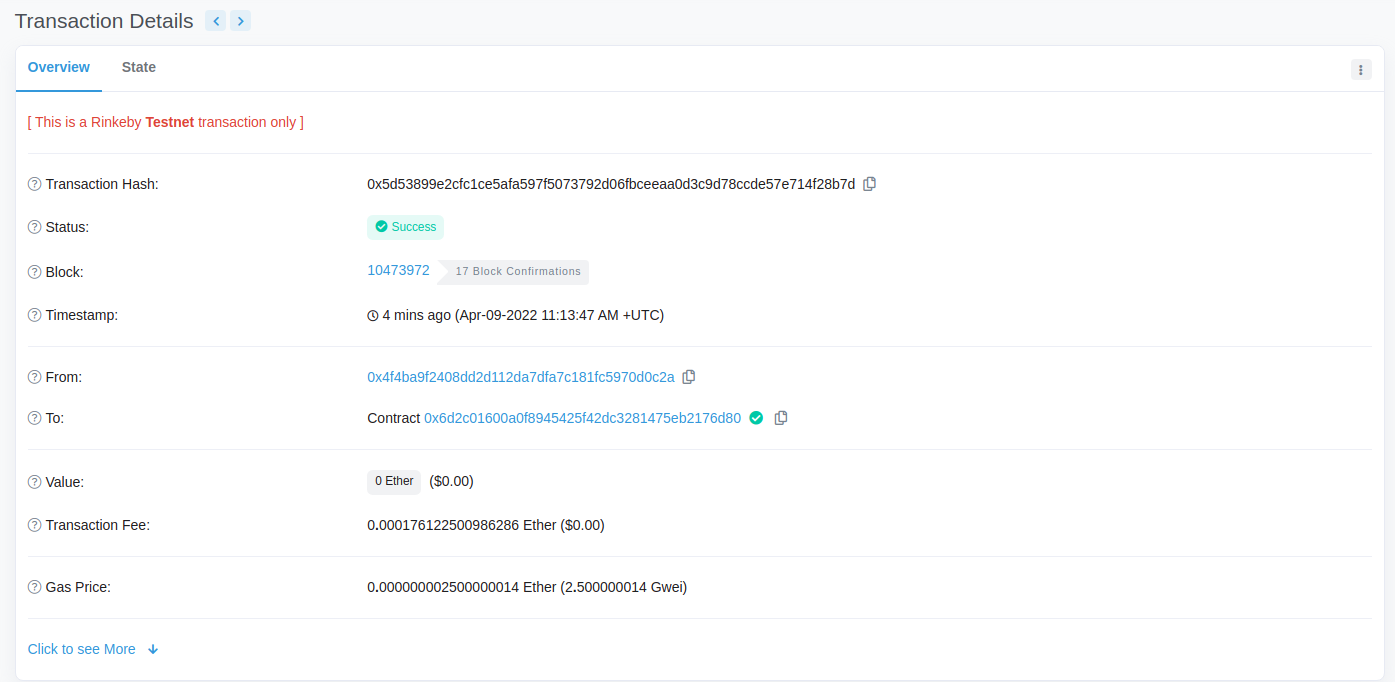
<p>When everything will be done, our transaction should be visible on <a href="https://rinkeby.etherscan.io/tx/0x5d53899e2cfc1ce5afa597f5073792d06fbceeaa0d3c9d78ccde57e714f28b7d" target="_blank" rel="noopener">Etherscan</a>
<img src="/posts/development/first-blockchain-contract/etherscan.png" alt="Etherscan"></p>
<p>And at the end we can check if <code>petOwner</code> field contains our definition:
<img src="/posts/development/first-blockchain-contract/rinkeby-data-confirmation.png" alt=""></p>
<hr>
<p><em>This post contains my notes from a Blockchain development tutorial available <a href="https://www.youtube.com/watch?v=M576WGiDBdQ" target="_blank" rel="noopener">here</a>.</em></p>
]]></content><category scheme="https://6f95e4af.mjasion.pages.dev/tags/ethereum" term="ethereum" label="ethereum"/><category scheme="https://6f95e4af.mjasion.pages.dev/tags/blockchain" term="blockchain" label="blockchain"/><category scheme="https://6f95e4af.mjasion.pages.dev/tags/solidity" term="solidity" label="solidity"/><category scheme="https://6f95e4af.mjasion.pages.dev/tags/tutorial" term="tutorial" label="tutorial"/></entry><entry><title type="html">Merging multiple Kubernetes configs</title><link href="https://6f95e4af.mjasion.pages.dev/notes/k8s/kubectl/?utm_source=atom_feed" rel="alternate" type="text/html"/><id>https://6f95e4af.mjasion.pages.dev/notes/k8s/kubectl/</id><published>2022-04-01T01:00:00+00:00</published><updated>2022-04-01T01:00:00+00:00</updated><content type="html"><![CDATA[<!-- Variable -->
<div class="note-card ">
    <div class="item">
        <h5 class="note-title"><span>Merging multiple Kubernetes configs</span></h5>
        
            <div class="card">
                <div class="card-body"><div class="highlight"><pre tabindex="0" style="color:#f8f8f2;background-color:#272822;-moz-tab-size:4;-o-tab-size:4;tab-size:4;-webkit-text-size-adjust:none;"><code class="language-bash" data-lang="bash"><span style="display:flex;"><span>KUBECONFIG<span style="color:#f92672">=</span><span style="color:#66d9ef">$(</span>ls ~/.kube/*.config | tr <span style="color:#e6db74">&#34;\n&#34;</span> <span style="color:#e6db74">&#34;:&#34;</span><span style="color:#66d9ef">)</span> kubectl config view --merge --flatten &gt; ~/.kube/config
</span></span></code></pre></div></div>
            </div>
        
    </div>
</div>

]]></content></entry></feed>